
Lowering the Negative Pressure Value of the Print Heads
Adjust the negative pressure value to be suitable for your usage environment. Dot drop-out and dot displacement occur when the negative pressure value is too high. In these cases, set a lower value.
MEMO
Check that the print-head carriage has returned to the maintenance station. If the machine detects an intrusion into the movable range of the print-head carriage while the carriage is not in the maintenance station, the safety protection function is activated to stop the machine.Safety Protection Function
Procedure
- Attach the object to be printed on for the printing test.
- Adjust the print head height automatically.
- Configure printing settings.
- Perform a printing test.
-
Check the result of the printing test.
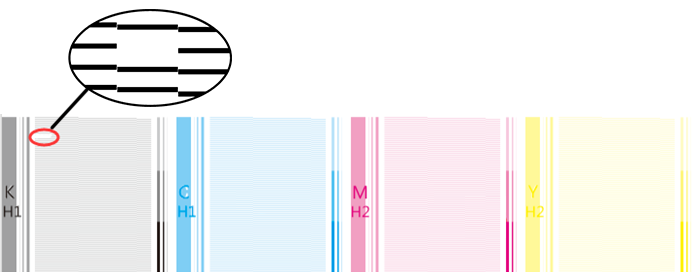
Check where dot drop-out or dot displacement occurs.
-
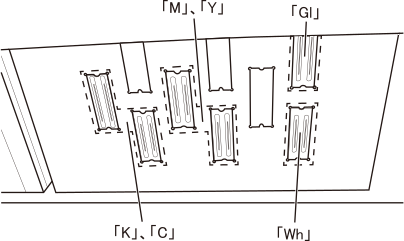
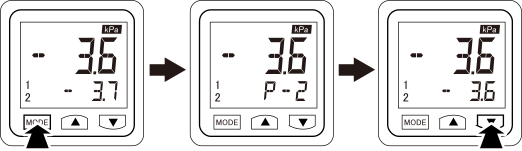
Adjust the negative pressure of the print head for which dot drop-out or dot displacement is occurring.
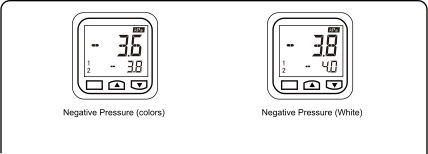
Adjust the negative pressure for the print heads K, C, Y, and M on Negative Pressure (colors) and for the print heads Gl and Wh on Negative Pressure (White).
IMPORTANT- Make a note of the negative pressure values P - 1 and P - 2 before starting adjustment.
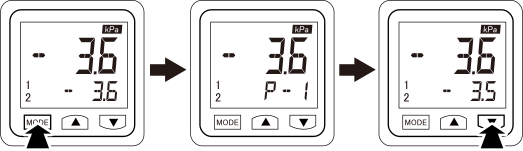
- To adjust the negative pressure, adjust the values of both P - 1 and P - 2. Be sure to set a value for P - 2 that is larger than P - 1.
- Change the value by 0.1 at a time during adjustment.
-
Press the [▼] button once.
-
Press the [▼] button once.
-
Perform a printing test.
Perform Steps 1 to 4, and perform a printing test.
-
Check the result of the printing test.
Check whether or not the problem has been resolved. It the problem persists, repeat adjustment until it is resolved.