
Liquid Cleaning
If dot drop-out or dot displacement persists even after cleaning, perform liquid cleaning.
Be sure to put on protective gloves and UV protective eyewear before performing this work.
Ink may drop or scatter.
- For liquid cleaning, an optional cleaning liquid is required. Contact your authorized dealer or visit our website (https://www.rolanddg.com/).
- Use new non-woven fabric when cleaning the bottom surface of the print-head carriage. When cleaning the surface, pay careful attention not to rub the nozzle surfaces.
- Use cleaning sticks when cleaning the print head nozzle surfaces. Cotton swabs or other lint-producing items may damage the print heads.
Check that the print-head carriage has returned to the maintenance station. If the machine detects an intrusion into the movable range of the print-head carriage while the carriage is not in the maintenance station, the safety protection function is activated to stop the machine.Safety Protection Function
-
Place the container under the maintenance station.
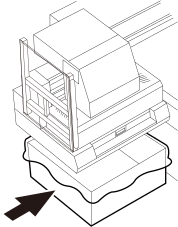
-
Slowly insert the ink receiver all the way.
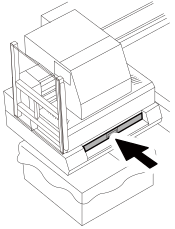
-
Clean the entire bottom surface (1) of the print-head carriage using new non-woven fabric impregnated with cleaning liquid.
IMPORTANT
- Wipe off the cleaning liquid completely.
- Do not touch the nozzle surfaces when cleaning the print heads and their surrounding areas.
- Clean the entire bottom surface and both side surfaces of the print-head carriage by removing adhering ink.
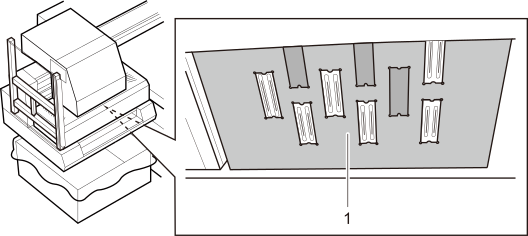
-
Press the ink flush button on the left side of the print-head carriage to discharge ink from the print head.
- Press and hold the [K] button for 10 seconds.
- Press and hold the [C] button for 10 seconds.
IMPORTANTDo not hold down the buttons for more than 10 seconds.
The ink storage, which is located on the upper side of the print head, runs out of ink. This allows air to enter the ink tube, causing ink discharge failure or decreased printing quality.
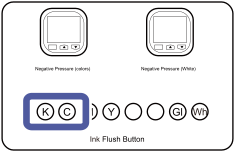
-
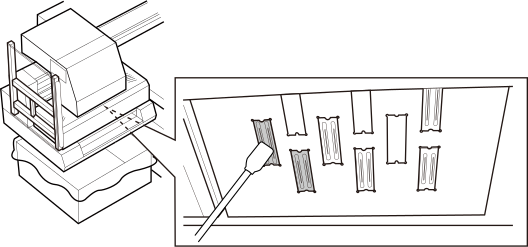
Clean the K and C print head nozzle surfaces using new cleaning sticks impregnated with cleaning liquid.
IMPORTANT
- Wipe off the cleaning liquid completely.
- Never rub the nozzle surfaces hard.
-
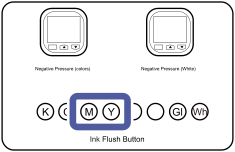
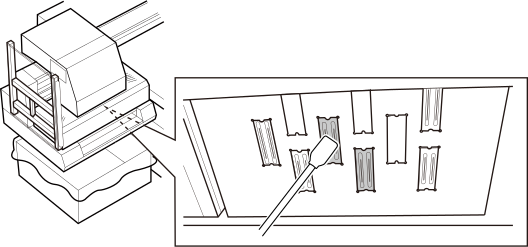
Clean the M and Y print heads.
Press the [M] and [Y] ink flush buttons, and clean the print heads following the same procedure as in Step 5.IMPORTANT
Do not hold down the buttons for more than 10 seconds.
The ink storage, which is located on the upper side of the print head, runs out of ink. This allows air to enter the ink tube, causing ink discharge failure or decreased printing quality.
 IMPORTANT
- Wipe off the cleaning liquid completely.
- Never rub the nozzle surfaces hard.
-
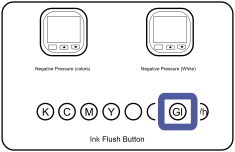
Clean the Gl print head.
Press the [Gl] ink flush button, and clean the print head following the same procedure as in Step 5.IMPORTANT
Do not hold down the buttons for more than 10 seconds.
The ink storage, which is located on the upper side of the print head, runs out of ink. This allows air to enter the ink tube, causing ink discharge failure or decreased printing quality.
 IMPORTANT
- Wipe off the cleaning liquid completely.
- Never rub the nozzle surfaces hard.
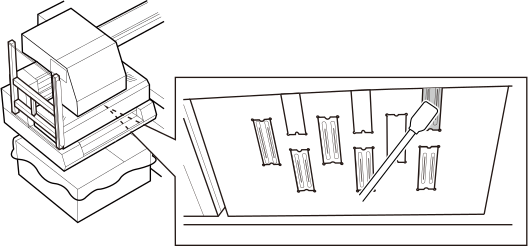
-
Clean the Wh print head.
Press the [Wh] ink flush button, and clean the print head following the same procedure as in Step 5.IMPORTANT
Do not hold down the buttons for more than 10 seconds.
The ink storage, which is located on the upper side of the print head, runs out of ink. This allows air to enter the ink tube, causing ink discharge failure or decreased printing quality.
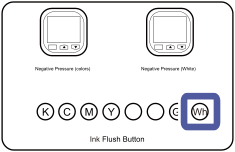 IMPORTANT
- Wipe off the cleaning liquid completely.
- Wipe off the Wh ink thoroughly because it easily adheres to the print head surface.
- Never rub the nozzle surfaces hard.
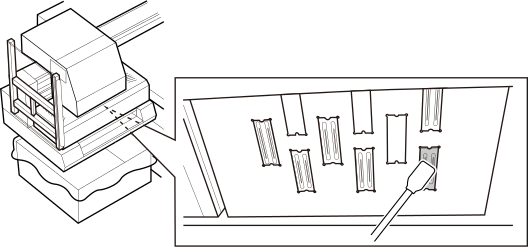
-
Slowly pull the ink receiver back toward you.
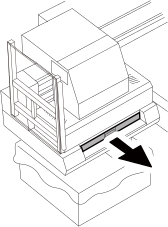
Perform a printing test to ensure that no dot drop-out or dot displacement occurs. If dot drop-out or dot displacement persists, repeat liquid cleaning.