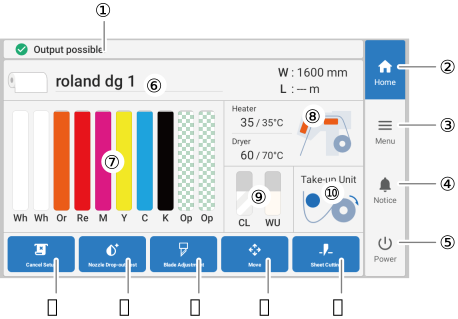
Displays the printer status and indicates the next operation.
Home
Displays the home screen.
Menu
Displays various setting menus.
Notifications
Displays important information. When there are notifications, their number is displayed next to the icon.
Sub power
Turn off the sub power. Tap the operation panel to turn the sub power back on.
Media information
Displays the media name and media width (W) for media that has been set up. If the remaining media setting has been configured, the remaining media (L) is also displayed.
Tap the media width (W) or the remaining media (L) to display the Remaining Media Management screen on which you can set the remaining media.
Displays the amount of ink remaining in each ink cartridge. If it is time to replace an ink cartridge, is displayed next to the corresponding cartridge. Tap this icon to display the detailed information for the ink.
Heater and dryer temperatures
The print heater and dryer temperatures are displayed as current temperature/set temperature. Tap one of these items to display a screen for:
Turning Print Heater on/off and setting its temperature.
Setting the temperature of Dryer.
Remaining cleaning liquid and wiper
Displays the remaining cleaning liquid and wiper. If there is little or no cleaning liquid or wiper remaining, a warning is displayed. If there is a small amount remaining, is displayed. If there is nothing remaining, is displayed.
Displays the status of the take-up unit. Tap this icon to display the Take-up screen and set Take-up during Cutting, Take-up Method, and Take-up Direction.
Displays the menu related to the printing test and cleaning for the nozzle drop-out (dot drop-out) test.
Blade Adjustment
Sets cutting conditions. This is only enabled when media has been set up.
Move
Feeds the media and moves the carriage. You can also set the position moved to as the right edge of the output area (the base point).Adjusting the Output-start Location
Sheet Cutting
Activates the separating knife to separate the media. You can also perforate the media to take it up and separate it at a later time.
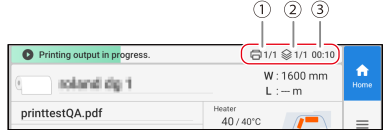
MEMOThe following are displayed during printing.
No.
Name
Details
Copies to Print
*/* is displayed. The left side indicates the number of the copy currently being printed. The right side indicates the total number of copies.
Number of Layers
*/* is displayed. The left side indicates which number layer is currently being printed. The right side indicates the total number of layers.

 is displayed next to the corresponding cartridge. Tap this icon to display the detailed information for the ink.
 is displayed.