
Printer Unit
Front
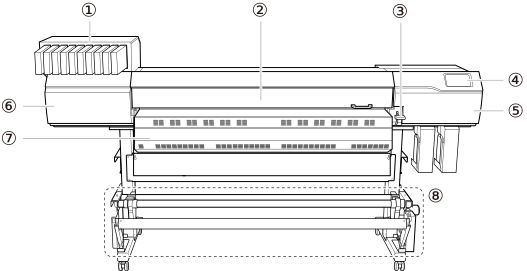
| No. | Name | Function overview |
|---|---|---|
| Ink slots | Insert ink cartridges in which ink pouches have been loaded. | |
| Front cover | Open this when necessary, such as when loading media. Another example of an operation that requires this cover to be open is maintenance. When not performing these types of operations, keep this cover closed. | |
| Loading lever (front) | Operate this when you load media. | |
| Operation panel | The panel used to operate the machine. | |
| Right cover | Open this when you perform maintenance. | |
| Left cover | Open this when you perform maintenance. | |
| Dryer | Dries the ink after printing. WARNING
High Temperature The areas inside the dryer, under the dryer, and near the extension apron become hot. Exercise caution to avoid burns. |
|
| Take-up unit | Takes up the media after printing.Take-up Unit |
Rear
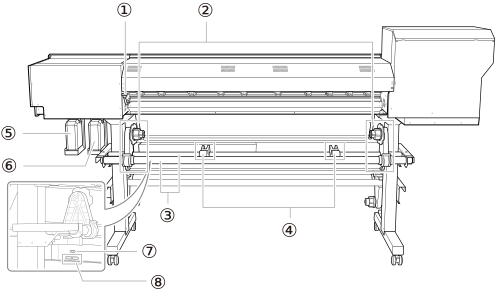
| No. | Name | Function overview |
|---|---|---|
| Loading lever (rear) | Operate this when you load media. | |
| Media holders | Operate this when you load media. | |
| Shafts | ||
| Media stays | ||
| Drain bottle (color ink section) | Discharged fluid is stored in this bottle. IMPORTANT Make sure that the optimizer ink and color ink section drain bottles are installed correctly. If the optimizer ink and color ink mix, the ink may harden and cause a malfunction. |
|
| Drain bottle (optimizer ink section) | ||
| Relay power-cord connector (dryer controller side) | Connects the printer and dryer controller via a relay power cord. | |
| Power-cord connectors | Connect the power cord. |
Side
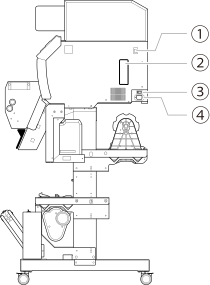
| No. | Name | Function overview |
|---|---|---|
| Ethernet connector | Connects an Ethernet cable. | |
| Cleaning liquid slot | Stores a cleaning cartridge containing a cleaning liquid pouch. | |
| Main power switch | Switches the main power on or off. | |
| Relay power-cord connector (printer side) | Connects the printer and dryer controller via a relay power cord. |
Front Cover Interior/Print Head Area
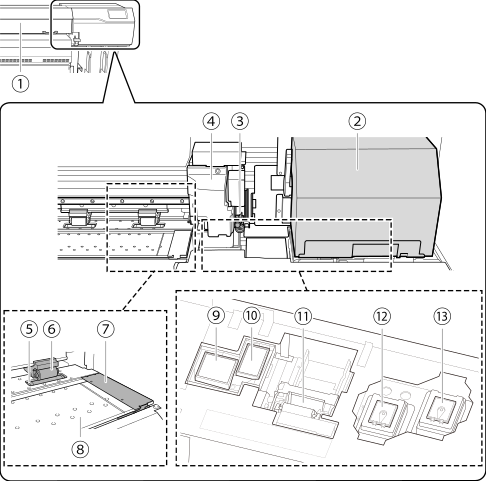
| No. | Name | Function overview |
|---|---|---|
| Print light | This light illuminates the front cover interior. This makes it easier to see the printing status. It flashes if a serious error occurs. | |
| Print-head carriage | The print heads are inside here. | |
| Separating knife | This separates the media. | |
| Cutting carriage | Moves independently of the print-head carriage, for example when setting the base point. | |
| Grit roller | This is one of these rollers that feed the media. | |
|
Pinch roller |
This clamps the media when the loading lever is lowered. | |
| Media clamp | This clamps the edge of the media to keep it from coming loose. It also prevents fuzz on the cut edge of the media from touching the print heads. | |
| Platen | This is the path over which the media passes. A suction fan that keeps the media from coming loose and a print heater that helps fix the ink are built in. | |
| Flushing sponge (color ink section) | To maintain print quality, ink discharged from the heads is absorbed. | |
| Flushing sponge (optimizer ink section) | ||
| Wiper | Cleans the print heads during automatic cleaning and in similar situations. We recommend that you always keep a replacement wiper on hand. Depending on where the wiper must be shipped to, it may take time for an ordered wiper to reach you. |
|
| Print head cap (color ink section) | Protects the print head surfaces and suctions ink during cleaning. | |
| Print head cap (optimizer ink section) |
Serious Errors Indicated by the Print Light
If an error that may lead to serious damage to the printer occurs, the print light blinks.
This indicates one of the situations shown below.
When the print light blinks, the error also appears on the operation panel's display screen.
| Display screen | Error overview |
|---|---|
| Print Head Dry-out Error | The print heads were about to dry out. The print heads may be damaged if allowed to dry out. |
| Motor Error | An excessive load was applied to the motor. If this error is not addressed, the print heads may be damaged. |
| Low Temperature Error | The printer's temperature has fallen below the temperature in which operation is possible. If this error is not addressed, the printer may malfunction. |
| High Temperature Error | The printer's temperature has risen above the temperature in which operation is possible. If this error is not addressed, the printer may malfunction. |
| Pump Stop Error |
An ink cartridge was pulled out during cleaning or another operation where ink was being suctioned, and the printer was left in this state. If this error is not addressed, the printer may malfunction. |
| Cleaning Error (Ink Cartridge) | An ink cartridge was pulled out or the ink ran out during light choke cleaning. Check the error details on the operation panel screen and take appropriate actions. |
| Cleaning Error (Drain Bottle) | A drain bottle was removed or became full during initial ink filling or light choke cleaning. Check the error details shown on the operation panel screen and take appropriate measures. |
| Take-up Unit Communication Error |
There is no response from the take-up unit. It is possible that the take-up unit is not connected correctly. |
| Dryer Error |
The dryer temperature has risen too high, the dryer temperature is not rising, or power is not being supplied to the dryer. Check the error details on the operation panel screen and take appropriate actions. |
| Service Call | An unrecoverable error or an error that requires a part replacement has occurred. |
If a Cover Opens during Operation
If the front cover, left cover, or right cover (hereinafter referred to as "cover") opens during an output operation or while setting up the media, the machine makes an emergency stop. When an emergency stop occurs, a message prompting you to close the cover appears on the screen. Close the covers as directed in the instructions shown on the screen.
When the cover is closed, you will be able to continue the operation.
If you cannot continue the operation even after you close the cover, a nonrecoverable error may have occurred.