
Step 2: Placing the Object
Procedure
-
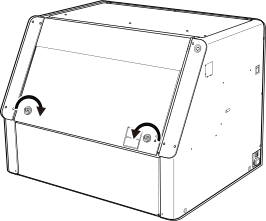
Hold the position shown in the figure and turn the knobs 180 degrees to the inside to open the front cover.
-
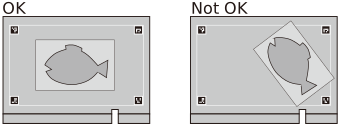
Place the object in the middle of the flat table.
In consideration of printing misalignment, we recommend that you place a protective sheet below the object.Cleaning the MachineMEMOTo prevent printing misalignment, note the following points.
- Place the part on which to print in the middle of the flat table.
- Place the object so it is not tilted in relation to the print data.
Printing Position Using Alignment Markers Is Misaligned
- Close the front cover.