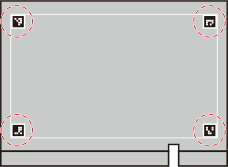
Print alignment markers (10 mm × 10 mm [0.39 in. × 0.39 in.]) near the four corners of the maximum printing area.
Procedure
Press the sub power button.
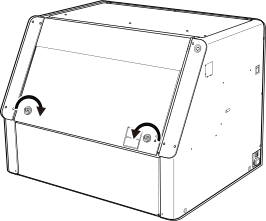
Hold the position shown in the figure and turn the knobs 180 degrees to the inside to open the front cover.
Affix single-color masking tape to the positions shown in the figure on the flat table.
MEMOWe recommend white masking tape to reduce printing time for alignment markers.
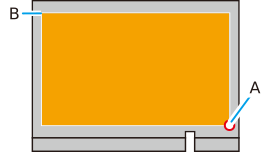
The affixing area (A) should be at least 12 mm (0.48 in.) from the white line.
If the white line is transparent, apply the tape over the white line until it is no longer transparent or use non-transparent tape.
It may not be possible to read the alignment markers if the line is visible.
Close the front cover.
Set up the tape pasted in step 3 in the maximum printing area.
Specify the print origin (A) as S: 0 mm (0 in.), F: 0 mm (0 in.) in Origin Relative. The upper-left corner of this area (B) is automatically set to the maximum position.
On the Utility home screen, click .
Click Preferences, and then click Execute for Alignment Marker Printing.


 .
.