
Printing Position Using Alignment Markers Is Misaligned
Is there a misalignment between the imaging position and the printing position?
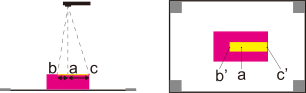
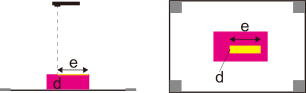
The higher the position at which imaging is performed, the smaller the misalignment, but it may become more difficult to read the alignment markers. The optimal imaging height varies from camera to camera, so perform imaging several times to find a good balance between the amount of misalignment and the reading.
For Device under Open AR Photo, did you select the machine that captured the image of the object to be printed on?
When importing a photo file into Designer, if you do not set Device under Open AR Photo to the machine that captured the image of the object to be printed on, the AR image will not be read correctly, which may misalign the printing position. Be sure to set Device to the machine that captured the image of the object to be printed on.