
Printing with Crop Marks
"Crop marks" are marks used to align positions. They are also called "alignment marks."
-
Printing on an object to be printed on that has crop marks
With an object to be printed on that has already been printed with crop marks, you can print with this machine using these crop marks as references.
-
Printing with crop marks
If you are removing the object that has been printed on and cutting it with a Roland DG Corporation machine that is capable of cutting, you have to align the printing and cutting positions. By printing the data together with crop marks, you can make it possible to align the positions using the crop marks.
-
When you print crop marks with this machine, the result is as shown in the following figure.
When printing crop marks, use your software RIP to configure the settings for printing crop marks. For information on how to make the setting, refer to the documentation for the software RIP you're using.
- When cutting with a Roland DG Corporation machine that is capable of cutting, the cuttable margin varies depending on the model. For details, refer to the user's manual of the model you will use to perform cutting.
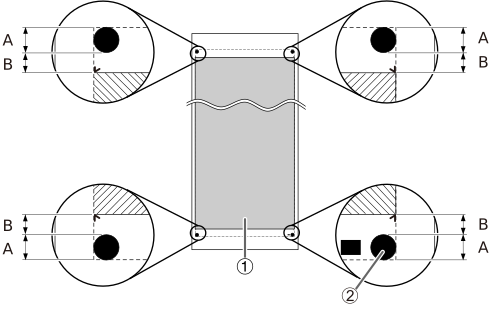
| Printing or cutting area*1 | |
| Crop Marks | |
| A | 12.5 mm (0.5 in.) |
| B | 10.0 mm |