
Enabling Automatic Height Adjustment during Printing
These settings allow the flat table height to be automatically readjusted and printing to continue when shifting or lifting up of the object to be printed on during printing is detected and there is a possibility of the print heads coming into contact with the object. This function is effective when using objects to be printed on that cannot be reprinted on.
Procedure
-
Tap
 .
.
- Tap .
-
Tap Clearance Settings to select Readjust.
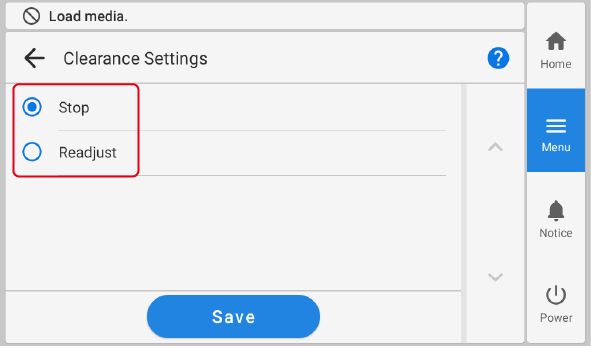
Clearance Settings Description Stop Cancels printing when the possibility of the print heads coming into contact with the object is detected during printing. Readjust Readjusts the flat table height and continues printing when the possibility of the print heads coming into contact with the object to be printed on is detected during printing. - Tap Save.
-
Tap
 to return to the home screen.
MEMO
to return to the home screen.
MEMODefault setting: Stop
MEMO- After printing, The table height was readjusted. Press [OK]. is displayed if the flat table height was automatically adjusted.
To prevent The table height was readjusted. Press [OK]. from being displayed, set Warning Display to
 (off).
 - When the flat table height is readjusted automatically and printing continues, the height setting is changed. Therefore, the print quality may change. Hence, proper printing requires that the object to be printed on be secured properly before printing to keep it from moving out of position or lifting up.
- The flat table height is automatically readjusted when the object to be printed on comes into contact with the head gap sensor.
- Printing will be canceled in the following cases, even if Readjust is selected.
If printing is canceled, Table Height Error is displayed.
- When the object to be printed on coming into contact with the head gap sensor is detected even though the flat table has moved to the bottom
- When the height reaches the maximum value (threshold) of automatic adjustment
The maximum value (threshold) for readjustment can be set.
- After printing, The table height was readjusted. Press [OK]. is displayed if the flat table height was automatically adjusted.