
2. Set Perforated Cutting Conditions
Procedure
- If Roland DG Connect Hub and VersaWorks are not running, start them.
- Click
 Print in the upper-right corner of the window.The Send To VersaWorks window appears.If editing of the design is in progress, perform the operation after saving the design file.
- On the Settings tab, set the following items.
- Local User
- Printer Name
When you enter values in these two locations, the other items are automatically set. Change them as necessary.
- Set Action incoming jobs under Job Management.
- Do Nothing
The job is sent to queue A of the model set in VersaWorks.
- RIP
The job is sent to queue A of the model set in VersaWorks and is processed by the RIP according to the settings of queue A.
- RIP and Print
The job is sent to queue A of the model set in VersaWorks and is processed by the RIP and is printed according to the settings of queue A.
- Do Nothing
- Click Controls, and then set Perforated cut conditions.
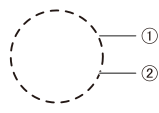
- : Perforation length
- Length of the part cut out from the material
- : Half-cut Length
- Length of the part not cut out from the material with suppressed blade force
Adjust the perforation force or the half-cut force according to the type of material.
Perforated length > Half cut length Perforated length = Half cut length Perforated length < Half cut length 


Perforation length: 20 mm (0.79 in.) Perforation length: 20 mm (0.79 in.) Perforation length: 1 mm (0.04 in.) Half-cut length: 1 mm (0.04 in.) Half-cut length: 20 mm (0.79 in.) Half-cut length: 20 mm (0.79 in.) - : Perforation length