
Cleaning the Table and Outside of the Machine
To use this machine safely for a long time, maintain it periodically.
Never climb on the table.
Doing so may result in injury. It may also decrease the table accuracy.
Be sure to put on protective gloves and UV protective eyewear before performing this work.
Ink may drop or scatter.
-
Set sufficient print margins to prevent ink from adhering to the table and put masking tape around the object to be printed on.
- If printing is applied to the table by mistake, stop printing immediately and wipe the ink off with dry fabric.
- Maintain the warning labels on this machine to ensure that they are clean and readable at any time.
If the warning labels are not readable because they are dirty or have peeled off, replace them with new copies of the same warning labels. To order warning labels, contact your authorized dealer or visit our website (https://www.rolanddg.co.jp/).
- To prevent cleaning tools and trash from dropping into the grooves (1) on the left and right edges of the flat table, cover the grooves with plastic sheets or similar material before performing this work.
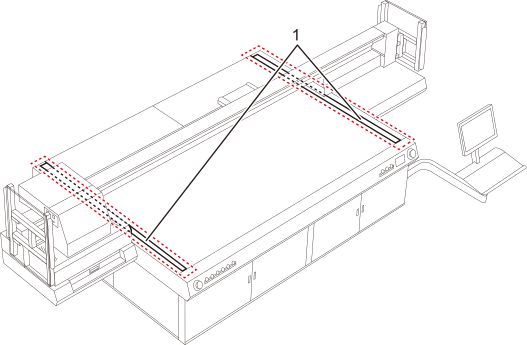
How to maintain
Check that the print-head carriage has returned to the maintenance station. If the machine detects an intrusion into the movable range of the print-head carriage while the carriage is not in the maintenance station, the safety protection function is activated to stop the machine.Safety Protection Function
Wipe the table and machine exterior with a dry soft cloth. If this does not work, wipe with a cloth that has been wetted with water and then wrung out very well. After wiping with a wet cloth, wipe with a dry cloth to completely remove any moisture.