
Removing Inks Adhering to the Table
The appropriate maintenance frequency differs according to the period of use and usage environment. Maintenance may also be required more frequently depending on the object to be printed on or the image being printed. Change the maintenance frequency according to your usage conditions.
If printing is applied to the table by mistake, stop printing immediately and wipe the ink off with dry fabric. This section explains how to remove hardened ink adhering to the table that cannot be removed by wiping.
Never climb on the table.
Doing so may result in injury. It may also decrease the table accuracy.
Be sure to put on protective gloves and UV protective eyewear before performing this work.
Ink may drop or scatter.
- Pieces of hardened ink remaining on the table may deform objects to be printed on or cause insufficient suction. Remove all of them using a cleaner or similar tools.
- Do not push pieces of hardened ink into the suction holes during cleaning.
- So that the removed ink pieces do not enter the grooves (1) on the left and right edges of the flat table, cover the grooves with plastic sheets or similar material before performing this work.
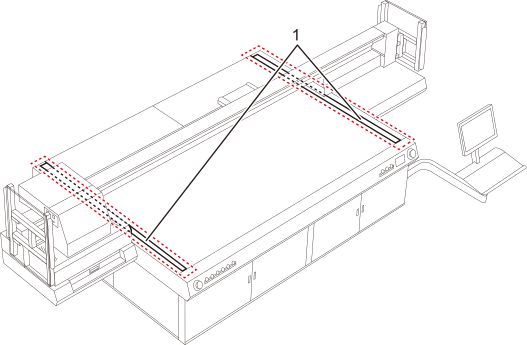
Check that the print-head carriage has returned to the maintenance station. If the machine detects an intrusion into the movable range of the print-head carriage while the carriage is not in the maintenance station, the safety protection function is activated to stop the machine.Safety Protection Function
-
Remove ink adhering to the tabletop plate.
If hardened ink adhering to the tabletop plate cannot be removed by wiping with a dry cloth, use a cloth that has been wetted with water and then wrung out very well. After wiping with a wet cloth, wipe with a dry cloth to completely remove any moisture.
-
Remove ink adhering to the suction holes.
Scrape out ink hardened in the suction holes using a tool with a sharp point. Clear scraped pieces of ink. These pieces of ink can be cleared using adhesive tape such as duct tape.