
Inside the Printer/Print Head Area
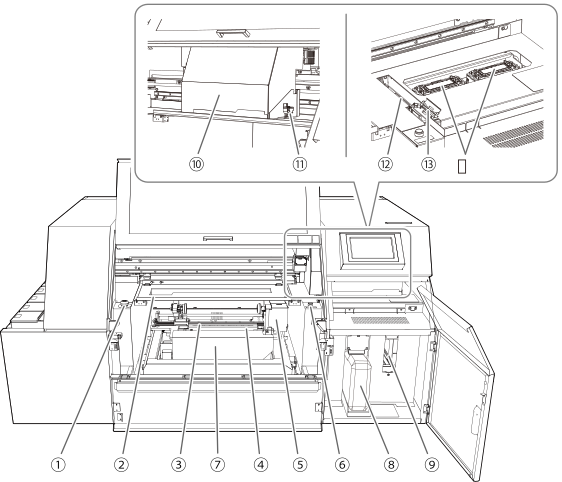
| No. | Name | Function overview |
|---|---|---|
| Emergency stop button |
This button is used to immediately stop the machine's operation in the event of an unintended movement of the machine due to an incorrect operation, etc. |
|
| Light shield cover | Covers so that UV light does not contact the ink discharge surfaces of the print heads during printing. It also prevents degradation of print quality caused by ink mist adhering to the object during printing. | |
| UV-LED device |
Irradiates the ultraviolet light. Irradiates the ultraviolet light on the print surface to cure the ink. |
|
| Support table | Adjusts the posture (angle) and height when chucking the object with the rotary device. Perform adjustment so that the center axis of the object aligns with that of the rotary device. | |
| Rotary device | Loads (grips) the object, orients it so the print surface is horizontal, then rotates the object. Attach a fixing jig suited to the object's shape to prevent detachment of the object from the rotary device and unstable rotation during printing. | |
| Load/unload button | If the media is selected, the object can be loaded or released from the rotary device. Pressing the button while an object is being gripped will release it. Pressing the button while no object is being gripped will result in the device gripping the object that has been placed on the support table. | |
| Table | Raises or lowers the entire rotary device to adjust the spacing between the print surface and print head nozzle surface. | |
| Drain bottle |
Stores cleaning liquid and discharged ink. When discharged fluid is nearly overflowing from the bottle, an error is displayed and printing is not possible. |
|
| Cleaning liquid slot |
A cleaning cartridge containing a cleaning liquid pouch is inserted here. |
|
| Print-head carriage |
Transports the built-in print heads. |
|
| Pointer | Shines the light when determining the printing area. The point of the shined light determines the printing reference point of the left and right edges of the printing area. | |
| Wiper | Cleans the print heads. Removes dirt and excess ink that have adhered to these heads. |
|
| Wiper cleaner | Removes ink and dirt that have adhered to the wiper. | |
| Print head caps |
Prevents the print heads from drying out. Seals to the print heads to protect the ink emission surface when the print heads are at the right side of the machine, such as when waiting for printing. |