Safety Devices
UV-LED devices are very dangerous because the ultraviolet radiation emitted from UV-LED devices can cause eye damage and skin diseases when directly irradiated on the human body. The machine is fitted with a cover to keep external leakage of ultraviolet radiation at low levels.
Therefore, if the front cover, under cover, or maintenance cover (hereinafter collectively referred to as the "covers") is opened during printing, lamp irradiation will immediately cease and operation will stop. At this time, a message is displayed on the operation panel prompting the user to close the cover. Close the covers as directed in the instructions shown on the screen. Also, if print data is received while the cover is open, printing will not begin.
When the cover is closed, you will be able to continue the operation. If you cannot continue the operation even after you close the cover, a nonrecoverable error may have occurred.
Front cover and under cover
This cover absorbs ultraviolet radiation from the UV-LED device and reduces it to a non-harmful level.
If the front cover or under cover is damaged or cracked, stop using the printer immediately and contact your dealer or service center.
Maintenance cover
This cover is opened and closed when the print heads and surrounding components are undergoing maintenance, during disposal of discharged fluid, or when cleaning liquid is being replaced. If opened while printing is in progress, the UV-LED device will immediately stop irradiating, triggering an emergency stop.
If the maintenance cover is damaged or deformed, stop using the printer immediately and contact your dealer or service center.
Emergency stop button
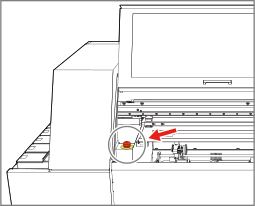
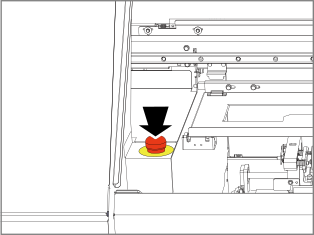
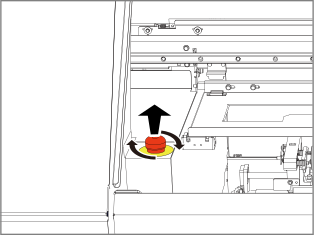
For emergency stop, push in the button shown in the figure. "Fatal Error" is displayed in the screen, and all operations of the machine are immediately stopped.