
Statuses Indicated by Status Light Color
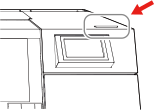
The status light colors indicate the following statuses.
| Status Light Color | Status |
|---|---|
| Off |
When the sub power is off and no periodic maintenance or other operations are being performed. |
| Blue |
When flashing, the machine is in sleep mode. |
| Green | When printing. A flashing light indicates that printing is finished. |
| Yellow | An object has been set, and the machine is ready to print. When flashing, printing has been paused. |
| Red |
When an error that can be recovered from or an error that makes it impossible to continue operation has occurred. The error details are shown on the operation panel. |