
Printable Materials and Shapes
In this manual, the printed matter is called "object" or "media."
The UV ink used in this machine is an ink that instantly adheres to the object by irradiating it with ultraviolet light. This makes it possible to perform printing on objects that are difficult to print on using conventional inks. Primer allows printing on a wider range of materials than printing with UV inks alone.
This section explains the materials and forms of objects using the machine.
Even materials with the same name have many variations with different properties depending on slight differences in ingredients, and even if the ingredients are the same, printing may or may not be possible depending on differences in surface treatment such as plating or coating.
Even if a material is listed as a printable material, always be sure to perform a test print to confirm that satisfactory print quality can be achieved.
Objects that cannot be printed on or have print quality issues
- In the case of objects that easily reflect light, the reflection of UV light may accelerate the curing of the UV ink on the surface of the print heads, resulting in ink discharge failure.
- When the UV light passing through the object exceeds the threshold value (80 μW/cm2), printing is not possible. The ink near the nozzle will be hardened by the UV light. This may make restoration impossible and force the replacement of the print head. Be sure to use a light meter specified by Roland DG to measure UV light.
- Objects that are electrostatically charged should be discharged before use.
If the object is electrostatically charged, the position of the ink landing will not be stable, and printing quality will be adversely affected.
- Objects with excessive unevenness cannot be used for printing.
Materials and Hardness
Even materials with the same name have many variations with different properties depending on slight differences in ingredients, and even if the ingredients are the same, printing may or may not be possible depending on differences in surface treatment such as plating or coating. An object with a material, shape, or thickness that is deformed by the force of chucking is not suitable for printing with this machine because the print surface cannot be kept level.
Even if a material is listed as a printable material, always be sure to perform a test print to confirm that satisfactory print quality can be achieved.
Material which can be printed on without using a primer
- ABS
- PET (polyethylene terephthalate)
- PC (polycarbonate)
- TPU (thermoplastic polyurethane)
- Acrylic
- Wood
- Bamboo
Material which can be printed on by using a primer
- Glass
- Aluminum
- Iron
- Stainless steel
Hardness of the object
An object where the print surface bends as a result of the pinching force of the rotary device or the centrifugal force of rotation is not suitable for printing with this machine. Try using a printer with a different fixing method, such as a flatbed printer.
Sizes and Shapes
This section describes the suitable shapes when printing on the surface of an object using the rotary device. It is not possible to print on objects with a shape that does not meet the following conditions.
Installable sizes and shapes
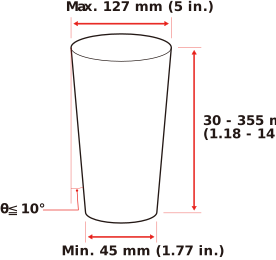
- Must be a rotating body (a three-dimensional object with a rectangular, trapezoidal, triangular or similar planar shape that can be rotated a full rotation around a straight line at the center).
- Diameter of rotating body: 45 to 127 mm (1.77 to 5.00 in.)
- Length of rotating body: 30 to 355 mm (1.19 to 13.97 in.) (However the maximum printing width is 300 mm (11.81 in.).)
- Taper angle: Max. 10°
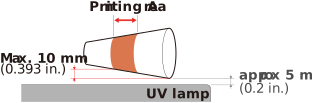
- For models with the UV-LED device located in front of the support table, the shape must be such that the distance between the UV light irradiation surface and the print surface does not exceed 15 mm (0.59 in.).
To allow the UV-LED device to get close to the location where the distance between it and the object is approximately 5 mm (0.2 in.), the height difference between the maximum diameter and the left edge of the printing area must be 10 mm (0.39 in.) or less.
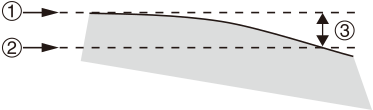
Shapes that cannot be printed on: When unevenness (variation in height) of the print surface exceeds 7 mm (0.28 in.)
The difference between the "highest position of the print surface" () and the "lowest position of the print surface" () within the printing area should be 7 mm (0.28 in.) or less ().
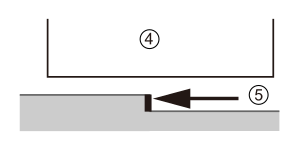
You cannot print on surfaces that are perpendicular to the print heads () or that have an overhang at the top that hides the surface beneath the overhang ().
Weight
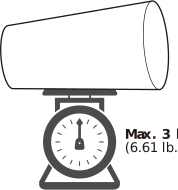
Printing is not possible on objects with a weight exceeding 3 kg (6.61 lb.)
First Object to be Printed on
If the object to be printed on has never been printed on using this machine before, be sure to perform a test print.
If you have an object to be printed on that is not a product, such as a sample or trial product, you can try printing on that.
In the test print, check the following.
- Does the ink adhere to the object to be printed on?
- Does it peel off when rubbed?
- Can you achieve satisfactory print quality?
In addition to the items listed above, the items to be checked will vary depending on the conditions required for the product. Exercise caution.