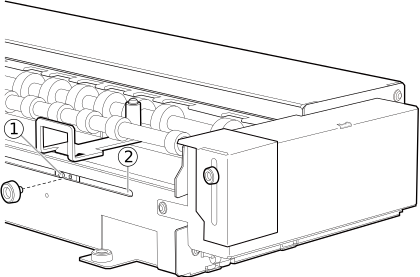
Attaching the Tail Stoppers
The tail stoppers prevent the object to be printed on attached to the rotary axis unit from moving to the left or right.
Use the tail stoppers when printing around the entirety of a cylinder, when printing layered colors, and in similar situations.
There are two types of tail stoppers: long and short.
-
Short tail stoppers
Use these tail stoppers when loading an object to be printed on that has a diameter of more than 35 mm (1.37 in.).
-
Long tail stoppers
Use these tail stoppers when loading an object that has a diameter of 10 to 35 mm (0.39 to 1.37 in.).
For information about purchasing tail stoppers, contact your authorized dealer.
Procedure
-
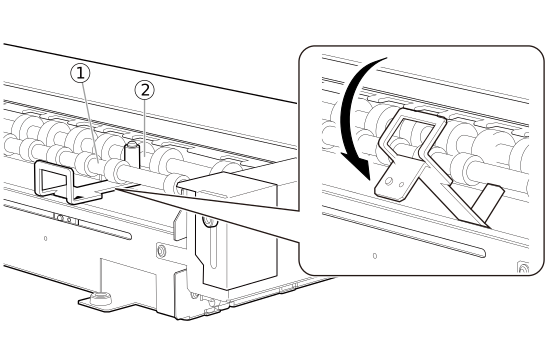
As shown in the figure, place the tip of the tail stopper between the front roller shaft and back roller shaft .
-
Fit the protrusion on the back of the tail stopper into the slide hole of the rotary axis unit, and then temporarily secure the tail stopper with a mounting screw.
Temporarily tighten the screw, ensuring that the tail stopper can still slide to the left and right.