
Emergency stop buttons
Press these buttons to immediately stop machine operation for safety reasons.
The emergency stop buttons are located in two positions: two buttons on the front of the machine and two buttons on the rear of the machine. After performing an emergency stop, check that the area around the machine is safe before canceling the emergency stop.
Procedure
-
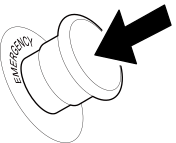
Press the button on either the left edge or right edge of the flat table.
Printer unit sub power turns off and machine operation immediately stops.
-
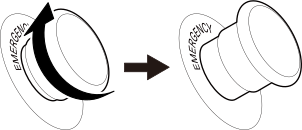
After confirming that it is safe to restart operation, turn the part of the pressed button shown in the figure clockwise.
The button pops out.
-
Press the [On] button on the front of the machine.
Sub power turns on and the button mark illuminates.
MEMOWhen you press an emergency stop button, the machine's sub power turns off automatically.