
Performing Various Adjustments Through a Sequence of Operations
You can perform various output adjustments through a sequence of operations by clicking Adjust All on the Adjustment tab. The adjustment method is the same as when adjusting settings individually.
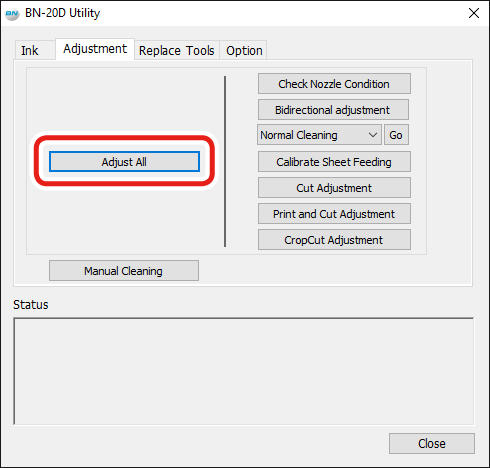
Click Adjust All to display the screen shown in this figure.
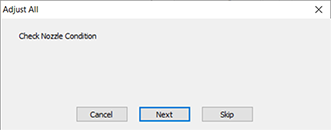
- Next: Continues to the screen for the adjustment currently displayed on the screen.
- Skip: Skips the adjustment currently displayed on the screen.
- Cancel: Cancels the adjustment process.
The adjustments vary depending on the output method. Refer to the table below.
| Printing (Only) | Cutting (Only) | Printing and Cutting | Crop-Cut | |
|---|---|---|---|---|
| Check Nozzle Condition | ✓ | - | ✓ | ✓ |
| Bidirectional adjustment*1 | ✓ | - | ✓ | ✓ |
| Calibrate Sheet Feeding | ✓ | ✓ | ✓ | ✓ |
| Cut Adjustment | - | ✓ | ✓ | ✓ |
| Print and Cut Adjustment | - | - | ✓ | ✓ |
| CropCut Adjustment | - | - | - | ✓ |
*1 This is available when bidirectional printing is set in the BN-20D driver or VersaWorks.