
Step 5: Reinstalling the Machine
Procedure
- Once the preparations are complete, move the machine without delay.
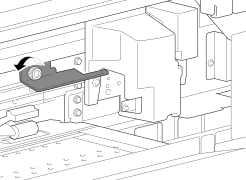
- Reinstall the printer immediately, and then remove the retainer securing the print heads in place.
-
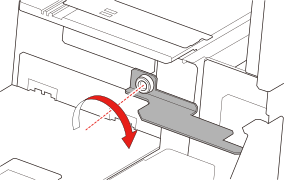
Install the retainer at the position indicated in the figure for storage.
The installation position is near the left edge of the machine on the inside (visible with the left cover open).
- Turn on the main power switch.IMPORTANT
To prevent the print heads from being damaged, move the machine with as little delay as possible and switch on the main power as soon as possible after moving the machine. To install the machine again, follow the procedure in the Setup Guide.
- Press the sub power button.
The home screen appears.
-
Check that the print heads are not dirty.
If they are dirty, follow the procedure below to clean them.
-
Tap
 on the operation panel.
-
Tap