
Cleaning around the Print Heads
The print heads are important components that discharge ink and require periodic and appropriate maintenance. Cleaning around the print heads is known as "manual cleaning."
- If you use up the cleaning sticks and cleaning liquid used for this work, contact your authorized dealer or visit our website (https://www.rolanddg.com/).
- The print heads are components that wear out. Periodic replacement is required, with the frequency of replacement depending on use. Contact your authorized dealer.
IMPORTANT
- Be sure to use different cleaning sticks in the color ink section and the optimizer ink section. Using the same cleaning stick may lead to the optimizer ink and color ink mixing, resulting in ink hardening and discharge issues.
- To prevent the print heads from drying out, finish this procedure in 10 minutes or less. After 10 minutes, the alarm will sound, so pause the procedure and perform the following operations.
- Close all the covers.
- Tap Finish All to finish the work.
- Restart the procedure from the beginning.
When a message appears
When a message appears, you can tap  on the home screen to check the notification details. Tap the notification to display the manual cleaning menu screen.
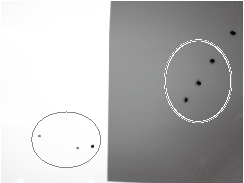
When symptoms of ink drips or dragging dirt occur
When any of the symptoms given below occur, clean around the print heads.
| Ink drips | Dragging dirt |
 |
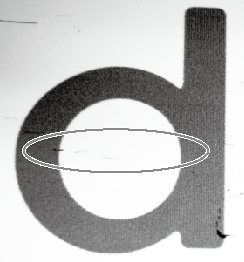 |
| Ink pools in dust or dirt adhered to the print heads, and drips onto the media. | The phenomenon where dirt or dust accumulates on the print heads. |
When symptoms that cannot be improved with cleaning occur
When any of the symptoms given below occur and performing cleaning functions (normal, medium, and powerful) is not effective, clean around the print heads.
| Dot drop-out/Dot displacement |
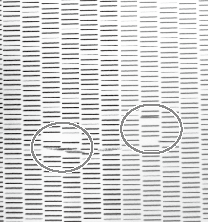 |
| Dust or other foreign matter adheres to the print heads and impedes correct ink discharge. |