
Step 11: From Initial Settings to Ink Filling
Turn on the machine, perform the initial settings on the printer (selecting the language, setting the units for length and temperature, selecting the ink type, etc.), attach the wiper and other included items required for printing, and then fill the machine with ink. When you turn the machine on, the setting items and operation procedure are displayed in order on the operation panel. Follow the displayed instructions to carry out the work.
Procedure
-
Switch on the printer's main power.
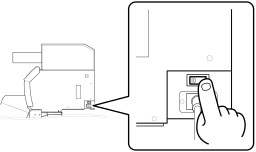
- Tap the operation panel.The operation panel turns on, and the Language screen appears.
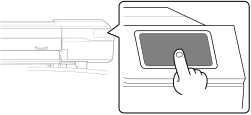
-
Follow the instructions on the operation panel to configure the settings and carry out the work.
IMPORTANT
- Do not insert empty pouch trays. Doing so may force air into the ink path and cause printer malfunctions.
- Exercise caution to insert ink cartridges in the ink slots that match their colors.