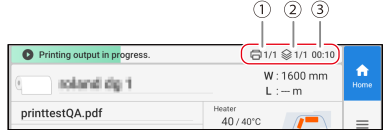
Displays the printer status and indicates the next operation.
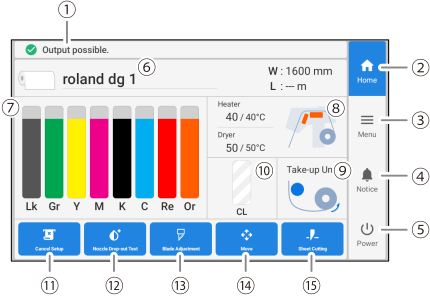
Home
Displays the home screen.
Menu
Displays various setting menus.
Notifications
Displays important information. When there are notifications, their number is displayed next to the icon.
Sub power
Switches the sub power of the machine on/off.
Media information
Displays the media name and media width (W) for media that has been set up. If the remaining media setting has been configured, the remaining media (L) is also displayed. Tap the media width (W) or the remaining media (L) to display the Remaining Media Management screen on which you can set the remaining media.
Displays the amount of ink remaining in each ink cartridge. If it is time to replace an ink cartridge, is displayed next to the corresponding cartridge. Tap this icon to display the detailed information for the ink.
Heater Temperature
The print heater and dryer temperatures are displayed as current temperature/set temperature. Tapping one of these items displays a screen for the following settings.
When media is set up
Turning Heater Power on/off.
Turning Print Heater on/off and setting its temperature.
Turning Dryer on/off and setting its temperature.
When no media is set up
Turning Standby Heater Temperature on/off and setting its temperature.
Take-up Unit
Displays the status of the take-up unit. Tap this icon to display the Take-up screen and set Take-up during Cutting, Take-up Method, and Take-up Direction.
Amount of cleaning liquid remaining
Displays the amount of cleaning liquid remaining. When the time for replacement arrives, is displayed.
Displays the menu related to the printing test and cleaning for the nozzle drop-out check.
Blade Adjustment
Sets cutting conditions. This is only enabled when media has been set up.
Move
The media can be fed and the cutting carriage can be moved. You can also set the position moved to as the right edge of the printing area (the base point).
Activates the separating knife to separate the media. You can also perforate the media to take it up and separate it at a later time. This is only enabled when media has been set up.
Media margins can also be adjusted after separating the media and cutting perforated lines.

 is displayed next to the corresponding cartridge. Tap this icon to display the detailed information for the ink.