
2. Installing the Cleaning Liquid and Selecting the Ink Type
Procedure
-
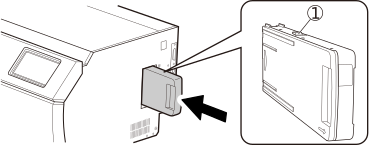
Set the cleaning cartridge in the cleaning liquid slot.
Orient the cartridge so its protrusion () is face up, and then, while keeping the cartridge level, insert the cartridge as far as it will go.
-
Ink Type Not Set screen will appear. Tap TR3 CMYK.
Select the ink type to use, and then tap OK to proceed to the next part of the procedure.
This is set to TR3 CMYK by default.
-
Tap Execute.
The Manual Cleaning during Ink Filling screen appears.