
3. Perform manual cleaning.
Be sure to perform operations as specified by the instructions, and never touch any area not specified in the instructions.
Sudden movement of the machine may cause injury.
| Required items | ||
|---|---|---|
 |
 |
 |
| Cleaning stick | Dropper | Cleaning liquid |
-
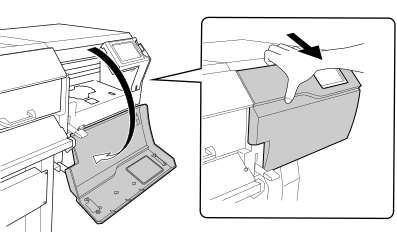
Open the right cover.
-
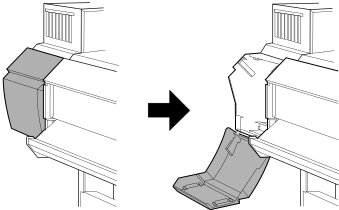
Open the left cover.
-
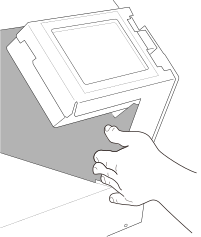
Touch the location shown in the figure to discharge any static electricity.
-
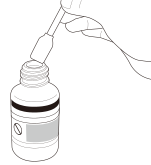
Moisten a new cleaning stick with the cleaning liquid.
MEMO
- Be sure to use one of the included cleaning sticks.
- Do not use a previously used cleaning stick.
- Do not put a previously used cleaning stick into the cleaning liquid.
-
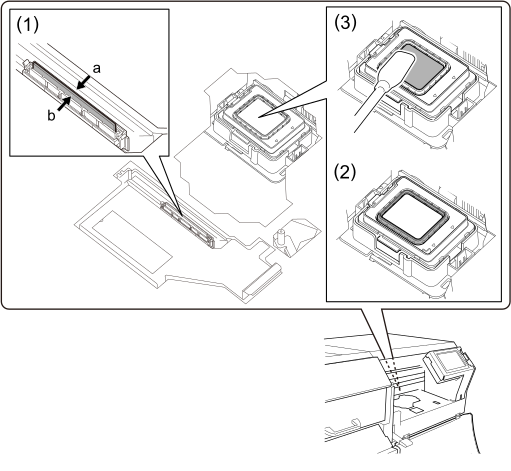
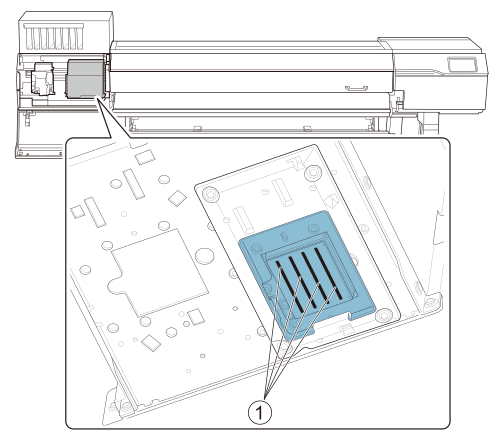
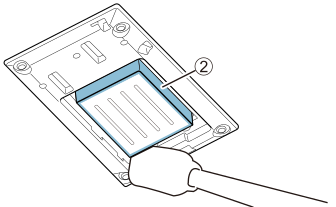
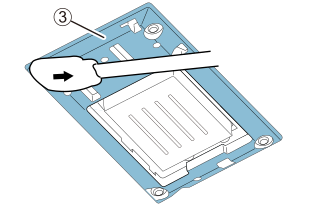
Clean the locations shown in the following figure.
Be especially careful to clean away any fibrous dust (lint).
(1): Wipe off wiper surfaces a and b with the cleaning stick.
(2): Wipe off the area in the figure with a cleaning stick.
(3): Use the wide surface of the cleaning stick, pressing the cleaning stick down while sliding between locations to clean up dirt.
-
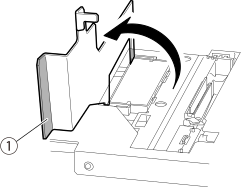
Grasping the part indicated by , open the flushing cover.
-
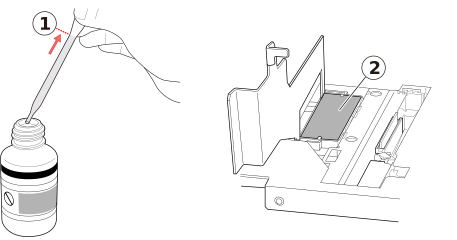
Suction out some cleaning liquid with the dropper, and then drip this cleaning liquid in the location indicated in the following figure.
Use the included dropper.
Firmly squeezing the dropper and suctioning out the cleaning liquid () fills the dropper with enough cleaning liquid for one location. Drip evenly onto the flushing sponge (), moistening all parts equally.
IMPORTANT- A low amount of cleaning liquid in these locations may lead to poor printing quality.
- When dripping the cleaning liquid, ensure that the tip of the dropper does not come into contact with the locations.
If it does, wipe away any dirt from the tip of the dropper before the next time you suction out cleaning liquid.
-
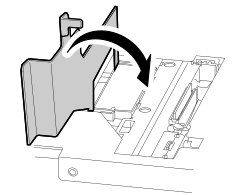
Close the flushing cover.
-
Moisten a new cleaning stick with the cleaning liquid.
-
Use the wide surface of the cleaning stick to wipe away any dirt from the locations shown in the following figure.
Be especially careful to clean away any fibrous dust (lint). Also wipe with the opposite, clean surface, ensuring that dirt from the dirty surface does not adhere to the head.
- Print headsIMPORTANT
Be careful not to wipe off the grooves on the print head surface ().
- Edges and sides of the print head ()
- Around the print head ()
- Print heads
-
Close the right and left covers, and then tap Finish All.
After the print-head carriage returns to its original position, cleaning starts.When the message Discard the discharged fluid in the bottle. appears on the operation panelMEMO
If an error occurs when the machine is filled with ink the second time or later, if the sub power is turned off to stop work, and in similar situations, the message Discard the discharged fluid in the bottle. will appear on the operation panel.
When this message appears, remove the drain bottle and discard the discharged fluid.
-
Remove the drain bottle and discard the discharged fluid.
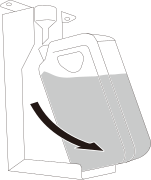
CAUTIONBefore you detach the drain bottle, be sure to wait for the screen to display Discard the discharged fluid in the bottle.. After discarding the discharged fluid, promptly attach the drain bottle to the machine.
Failing to follow this procedure may cause discharged fluid to flow out of the tube and spill, soiling your hands or the floor.
IMPORTANTWhen you remove the drain bottle, a few drops of discharged fluid may come out of the machine. Exercise caution to prevent this fluid from soiling your hands or the floor.
-
Remove the drain bottle and discard the discharged fluid.