
Out-of-ink Warnings
Never reuse an ink cartridge for which the machine shows a sign indicating no ink.
Occasionally the machine will show a sign indicating no ink even if there is a small amount of ink remaining in the cartridge. Such an ink cartridge is in a state where drawing ink from it is impossible, so using it in such a state may force air into the ink path and cause malfunctions.
If ink runs out
- If ink runs out during printing, printing is paused.
- If ink runs out during cleaning, cleaning is canceled.
Wh ink
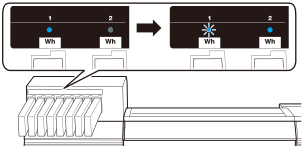
Also, Ink has run out. is displayed on the operation panel. If both the cartridges in the slots of a pair run out of ink, printing pauses and two short warning beeps sound.
Because two Wh ink cartridges are used at the same time, the amount of ink in the cartridges of these slots decreases in nearly the same manner.
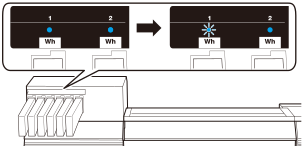
Also, Ink has run out. is displayed on the operation panel.
CMYK ink
When an ink cartridge runs out, printing pauses and two short warning beeps sound. The LED also flashes as shown in the following figure for slot 3.
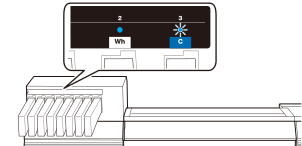
When printing pauses, the message Ink has run out. appears on the operation panel.