
Refilling Inks
This section describes how to refill the ink when you are notified that it is possible to do so.
Never store ink, cleaning liquid, or discharged fluid in any of the following locations.
- Any location exposed to open flame
- Any location where high temperature may occur
- Near bleach or any other such oxidizing agent or explosive material
- Any location within the reach of children
Fire may be a danger. Accidental ingestion by children may pose a health hazard.
- Use an ink bottle that is within the expiration date.
- Never under any circumstances use anything other than the specified type of ink bottle.
-
The ink bottles must be purchased separately. Contact your authorized dealer or visit our website (https://www.rolanddg.com/).
-
The ink tank is a consumable item. To purchase consumable items, contact your authorized Roland DG Corporation dealer or visit our website (https://www.rolanddg.com/).
-
Tap
 .
A notification screen appears.
.
A notification screen appears. -
Tap the notifications.
The Refilling Inks window appears.
- Tap Execute.
- Remove the ink bottle and ink IC from the ink bottle box.
-
Follow the onscreen instructions to replace the ink IC and insert the ink bottle.
Before inserting the ink bottle
Shake the ink bottle 50 times (about 20 seconds).
The precipitation of the ingredients in the ink disables printing in normal color. So that the ink mixes well, turn the ink bottle so it is horizontal and shake it left/right.IMPORTANT Firmly hold the ink bottle so that you do not drop it. If the ink bottle falls, it may cause damage or printer malfunctions.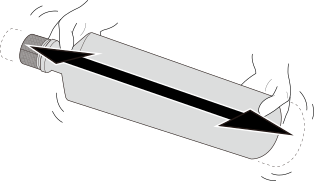
How to insert the ink bottle-
Insert the ink bottle into the ink tank.
Place the ink bottle pouring port () against the projection on the ink tank and press it all the way in. The sealing is broken and ink flows into the ink tank.IMPORTANT
Ink labels indicating the colors are affixed to the machine. Insert each ink bottle into the slot whose label matches the color of the ink in the bottle. Inserting an ink bottle of the wrong color may cause malfunction. Be careful not to insert the wrong ink bottle. If you insert an incorrect ink bottle by mistake, contact your authorized dealer.
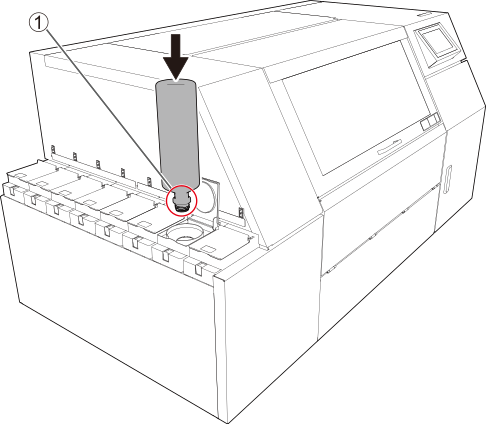
-
When all the ink in the bottle has been poured into the ink tank, pull out the ink bottle while pressing the lock release ().
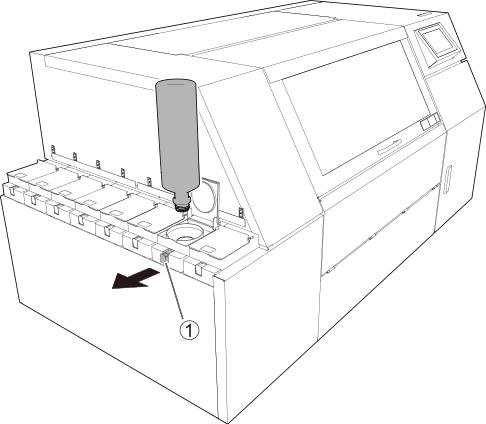
-
Insert the ink bottle into the ink tank.
-
Tap Refill the next tank.
Repeat Step 7.
- When refilling of all the ink is complete, tap Finish.