
Timing of Ink Refilling
The remaining ink display on the home screen shows whether ink can be refilled and the amount of ink remaining.
IMPORTANT If  or
or  is not displayed, do not refill the machine with ink. Doing so will cause the ink to overflow from the ink tank.
or is not displayed, do not refill the machine with ink. Doing so will cause the ink to overflow from the ink tank.List of icons
|
|
Remaining ink level low. Refill the ink. Refill the ink as soon as possible during the time between tasks. |
|
Ink has run out. Refill the empty ink. |
 |
Ink IC is not set. Insert the ink IC. |
 |
Incorrect ink IC was loaded. Insert the correct ink IC. |
|
|
Replace with a new ink IC. Insert the new ink IC. |
|
|
Refill with new ink. Refill the ink. |
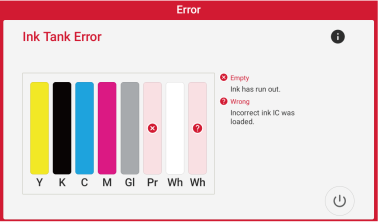
When ink runs out or when an incorrect ink IC is loaded, an Ink Tank Error appears.
Correct the error.
IMPORTANT If ink runs out during printing, printing is stopped. Printing cannot be resumed even after refilling the ink.
MEMO If ink runs out during cleaning, cleaning is interrupted. When the ink is refilled, cleaning resumes.