
Changing the Media Settings
This section explains how to change media settings during setup.
Procedure
-
Tap
 on the operation panel's home screen.
If the home screen is not displayed, tap
on the operation panel's home screen.
If the home screen is not displayed, tap .
. - Tap in sequence.
-
Tap
 next to the setting you want to change to move to the screen for editing this setting.
The media settings that can be changed are as follows.
next to the setting you want to change to move to the screen for editing this setting.
The media settings that can be changed are as follows.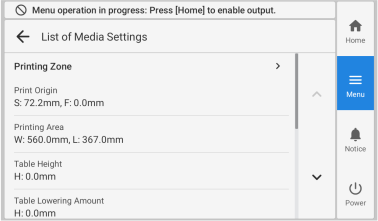
List of Media Settings Reference Printing Zone Steps 4-(2) through (5) of Determining the Print Surface Height and Printing Position Small-diameter Adapter Step 2-(5) of Determining the Print Surface Height and Printing Position Printing Movement Range IO-300 User's Manual: "Speeding Up Printing for Narrow Objects to Be Printed on" - If you have changed a setting, tap Save Settings or Save.
-
Tap to return to the home screen.