Removing Media from the Take-up Unit
When output is complete, separate the media, take up the media manually, and then remove the media.
WARNING
Handling roll media is an operation that must be performed by 2 persons or more, and care must be taken to prevent falls.
Attempting to lift heavy media in a manner that taxes your strength may cause physical injury. Also, if dropped, such items may cause injury.
Procedure
- Lower the dancer roller toward the rear.
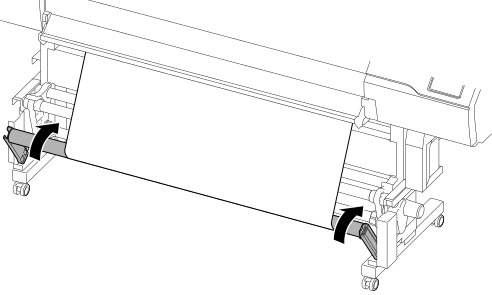
- Close the front cover.
- With the media held down, tap
 Sheet Cutting on the operation panel.For more information on sheet cutting, refer to Separating the Media.
 - Use the MANUAL switch to take-up the media.
When using the FORWARD setting Take up the media with FORWARD. 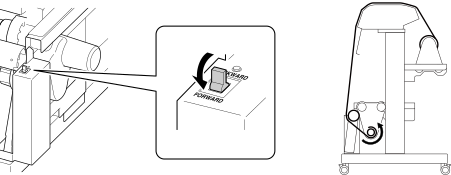
When using the BACKWARD setting Take up the media with BACKWARD. 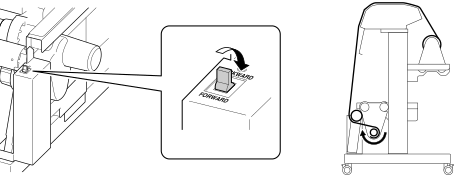
- While supporting the media from below, loosen the securing lever on the left media holder.
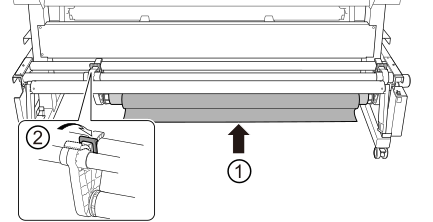
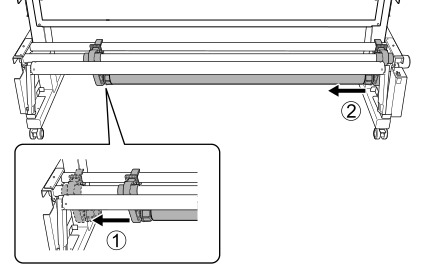
- With the media supported, pull the paper tube and media from the end cap.