
Checking before Output
LAN (Local Area Network) Settings
Check that you can perform communication through the LAN (Local Area Network).
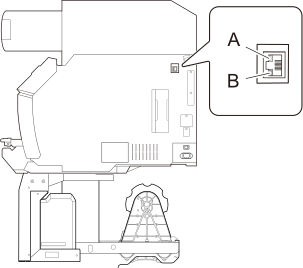
| A | Activity LED | This lights up or flashes orange while data is being received from the network. |
| B | Status LED | This indicates the status of the communication function. When it lights in green, communication is possible. |
Preventing Sedimentation in Inks
The precipitation of the ingredients in the ink disables printing in normal color. So that the ink mixes well, shake the ink cartridge horizontally with a stroke length of around 5 cm (1.97 in.) from each end of the ink cartridge.
- All inks: When replacing an ink cartridge with a new one.
- White ink: Each day (before starting the day's operations).
Remove the white ink cartridge, shake it 50 times (about 20 seconds), and then reinsert this cartridge.
The ingredients in white ink tend to settle. Each day, before starting the day's operations, be sure to shake this cartridge. Allowing the ink to stand can cause the settled material to harden, resulting in malfunctions or other problems.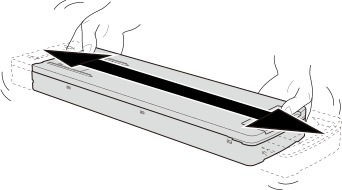
The ingredients in white ink tend to settle.
Allowing the ink to stand without shaking it can cause the settled material to harden, resulting in malfunction or other problems.
Before shaking the ink cartridge, wipe off any ink from around its mouth.
If you do not wipe off the ink, it may splatter when you shake the ink cartridge.
When you have finished mixing the ink, reattach the ink cartridge immediately.
Taking time to reattach the ink cartridge will adversely affect the ink path.
- Firmly hold the ink cartridge with both hands when shaking it.
When shaking the ink cartridge, firmly hold it with both hands to prevent the ink cartridge cover from coming loose. The cover or ink pouch coming loose and falling may cause damage or printer malfunctions.
- Shake the white ink cartridge once a week.
Even if you are not using the printer, shake the white ink cartridge 50 times (about 20 seconds) once a week.
To prevent ink precipitation, you can make the machine periodically display a message prompting you to mix the ink.
Showing/Hiding Notifications