
Front
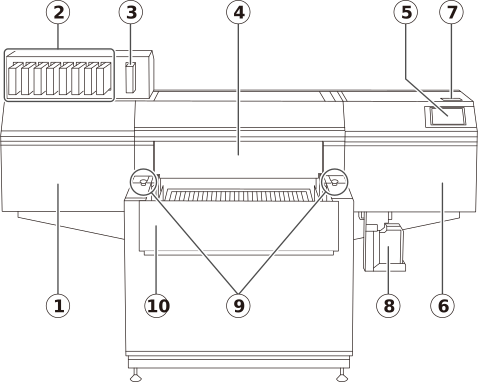
| No. | Name | Function overview |
|---|---|---|
| Left cover |
Provides access to the interior of the left side of the machine. Open this cover when performing maintenance such as cleaning around the print heads. |
|
| Ink slots |
Insert ink cartridges in which ink pouches have been loaded. | |
| Cleaning liquid slot |
A cleaning cartridge containing a cleaning liquid pouch is inserted here. |
|
| Front cover |
Prevents contact with the print-head carriage and other such fast-moving parts when the machine is operating and reduces ultraviolet light from the UV-LED device. To prevent excessive dust from entering inside the printer, keep the front cover closed except when loading objects to be printed or when performing maintenance. | |
| Operation panel |
Used to perform all machine operations including printing, setup, and maintenance. | |
| Right cover |
Provides access to the interior of the right side of the machine. Open this cover when performing maintenance such as cleaning and part replacement. | |
| Status light | Uses colors to indicate the status of the machine. | |
| Drain bottle |
Stores cleaning liquid and discharged ink. When discharged fluid is nearly overflowing from the bottle, an error is displayed and printing is not possible. |
|
| Emergency stop buttons |
These buttons are used to immediately stop the machine's operation in the event of an unintended movement of the machine due to an incorrect operation, etc. |
|
| Front UV Shield |
You can remove the front UV shield to make it easier to load on the flat table the object to be printed on. Only open the front UV shield when necessary, such as when loading the object to be printed on. In all other situations, close the front UV shield. |