
Inside the Printer/Print Head Area
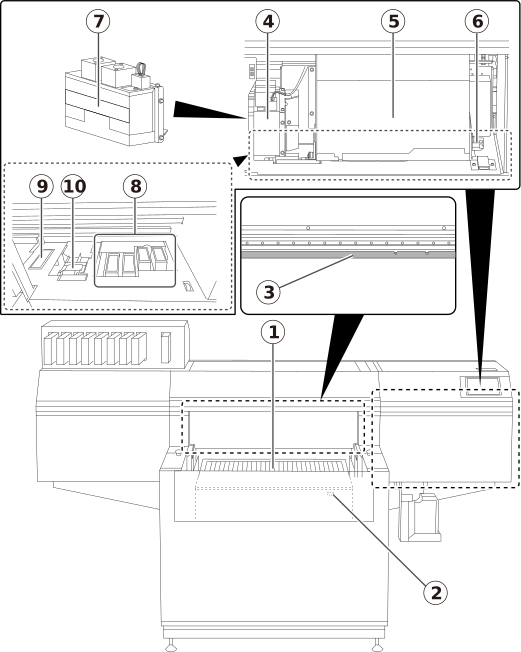
| No. | Name | Function overview |
|---|---|---|
| Flat table |
Table on which the object is placed. When the vacuum is on, the object to be printed on is suctioned to prevent warping or lifting up of the object. | |
| Rotary axis unit connector |
Connector to be used to connect the optional rotary axis unit. |
|
| Head gap sensor |
Comes into contact with the object and sets its height. |
|
| UV-LED device |
Irradiates the ultraviolet light. Irradiates the ultraviolet light on the print surface to cure the ink. |
|
| Print-head carriage | Transports the built-in print heads and UV-LED device. | |
| Pointer |
Shines the light when determining the printing area. Set the points of the light that is shined to the lower right and upper left of the printing area, respectively. |
|
| UV mist filters | Absorb the ink mist generated during printing to reduce the amount of ink mist that adheres to the UV-LED device. | |
| Print head caps |
Prevent the print heads from drying out. Seals to the print heads to protect the ink emission surface when the print heads are at the right side of the machine, such as when waiting for printing. |
|
| Flushing sponge |
Absorbs the ink discharged from the print heads to prevent clogging. |
|
| Wiper |
Cleans the print heads during wiper automatic cleaning and in similar situations. |