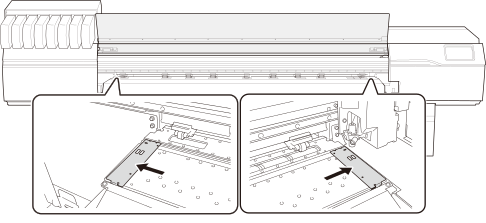
Move the media clamps to the outside of the grit rollers on the left and right edges respectively.
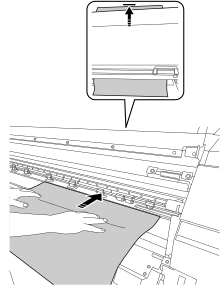
Pass the leading edge of the media between the pinch rollers and the grit rollers, and feed the media until the center of the media length is near the top of the grit rollers.
The media placement location will be adjusted later, so exact placement is not necessary. Feed the media to a location where it will not fall when your hand is removed.
Slide the media sideways and place both the left and right edges on the grit rollers.
Be sure to place the right edge of the media on the right-end grit roller.
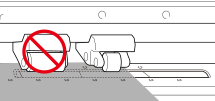
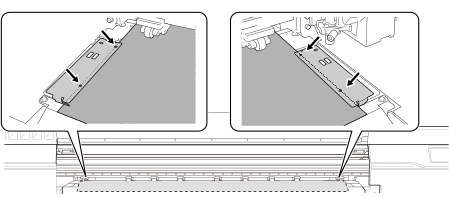
IMPORTANTDo not place the media in the area marked in the figure (to the right of the screw holes indicated by arrows).
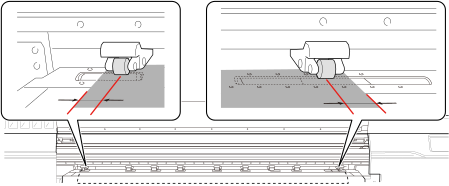
Move the left and right pinch rollers so that they are above the grit rollers on which the media is located.
Position them approximately 10 mm (0.39 in.) from each edge of the media.
IMPORTANTBe sure to use the left and right pinch rollers. The force with which the media is pinched varies between the middle pinch rollers and the left and right pinch rollers. Using the middle pinch rollers to pinch the media edges will lead to unstable media feeding.
MEMOTo smoothly move the pinch rollers, push down close to the rail.
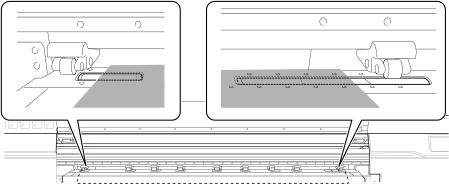
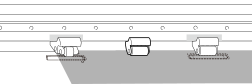
Move the middle pinch rollers used for feeding the media (gripping the media) over the grit rollers.
Do not place the middle pinch roller on the rightmost of the three grit rollers.
Check the grit patterns for the location of the grit rollers.
Move the other middle pinch rollers to positions where no grit patterns are present.
Where no grit patterns are present, the middle pinch rollers will not come down.
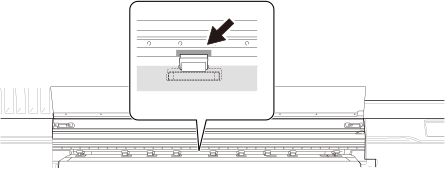
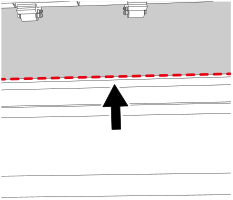
Feed the media to the back, and align the front edge with the position shown in the figure.
Check and adjust the media position and angle as necessary.
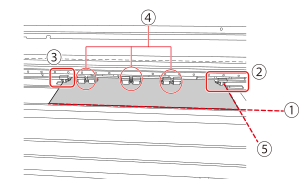
: Align the front edge of the media to the position shown in the figure.
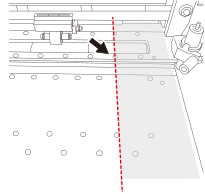
: Move the right edge of the media above the rightmost of the three grit rollers, and move the pinch rollers about 10 mm (0.39 in.) inside from the edge of the media.
IMPORTANTDo not place the media in the area marked in the figure (to the right of the screw holes indicated by arrows).
: Move the left edge of the media above the grit rollers, and move the pinch rollers about 10 mm (0.39 in.) inside from the edge of the media.
: Move the middle pinch rollers used for feeding the media (gripping the media) to where the grit patterns are present, and move the other middle pinch rollers to where there are no grit patterns present.
: Place the media parallel with the feed direction so that the media is not fed at an angle.
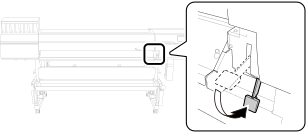
Lower the loading lever (front).
Line up the edges of the media with the centers of the holes of the left and right media clamps.

 on the operation panel.
The sub power is switched on.
on the operation panel.
The sub power is switched on.