
Part Names and Functions
Front
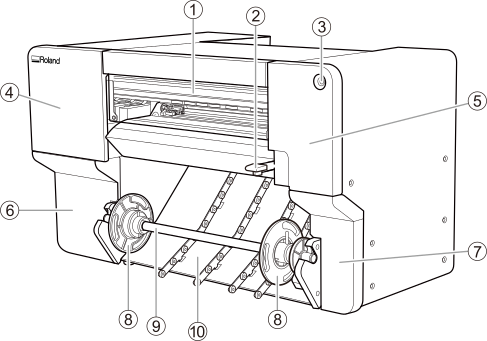
| No. | Name | Function overview |
|---|---|---|
| Front cover | Prevents contact with the print-head carriage and other such fast-moving parts when the machine is operating. This cover also prevents dust from entering the machine. Keep this cover closed when not loading media or performing maintenance. | |
| Loading lever | Secures the media in place and releases it. Lowering this lever secures the media in place. | |
| Sub power button | Switches the sub power of the machine on/off. | |
| Left cover | Provides access to the interior of the upper-left side of the machine. Open this cover when cleaning around the print heads. | |
| Right cover | Provides access to the interior of the upper-right side of the machine. Open this cover when performing maintenance such as cleaning and part replacement. | |
| Lower-left cover | Provides access to the interior of the lower-left side of the machine, where maintenance supplies and similar items are stored. | |
| Lower-right cover | Provides access to the interior of the lower-right side of the machine. Open this cover when performing maintenance such as drain pack replacement. | |
| Media flanges | Hold the roll media. Fit the paper tube of the media onto the media flanges of the media holders. | |
| Shaft | Holds the media flanges. The left media flange is moved to the left or right along this shaft to match the width of the media. | |
| Media feed rollers | Reduce the contact resistance when there is slack in the media such as during media pullback. |
Inside the Cover
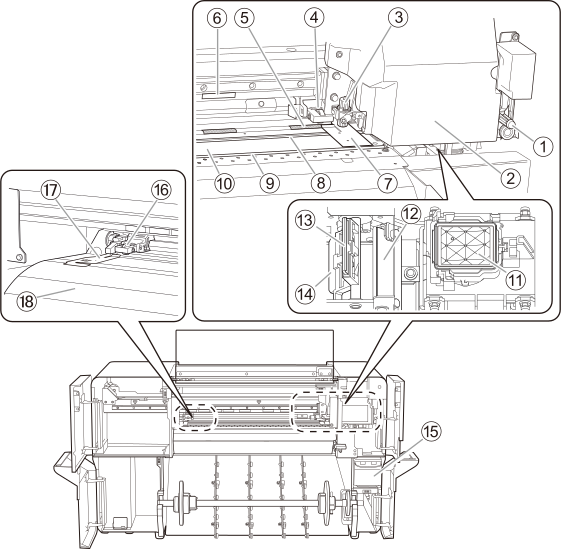
| No. | Name | Function overview |
|---|---|---|
| Separating knife | The knife used to separate the media. | |
| Print-head carriage | Transports the built-in print heads, blade, and separating knife to the left and right. | |
| Blade holder | Holds the blade used during cutting. | |
| Right pinch roller | Each pinch roller is lowered/raised according to the operation of the loading levers. Lowering a loading lever lowers the pinch rollers, clamping the media. You can move this roller to the left and right within the range of the right-edge grit roller. | |
| Grit roller | Transports the media. | |
| Grit pattern | Indicates the positions in which the left pinch roller can be positioned. When loading media, be sure to place the left pinch roller within the range indicated by this pattern. | |
Right media clamp | Clamps the right edge of the media. This clamp holds down the right edge of the media, keeping the media from coming loose and preventing fuzz on the cut edge of the media from touching the print heads. | |
| Blade protector | This is the path that the blade takes during cutting. It protects the tip of the blade. | |
| Separating groove | The path for the separating knife during sheet cutting. | |
| Platen | This is the path over which the media passes. A suction fan that keeps the media from coming loose and a print heater that helps fix the ink are built in. | |
| Cap top | Prevents the print heads from drying out. Seals to the print heads to protect the ink emission surface when the print-head carriage is at the right side of the machine, such as when waiting for printing. | |
| Scraper | Removes ink and dirt that have adhered to the wiper. | |
| Wiper | Cleans the print heads. Removes dirt and excess ink that have adhered to these heads. | |
| Felt wiper | Cleans the edges of the print heads after wiper operation. Absorbs residual ink and dirt from the edges of the print heads. | |
| Drain cartridge | Accumulates the discharged ink. If the drain pack in this cartridge is full of discharged fluid, a message prompting you to replace the pack will appear in the Utility window. If this message appears, replace the drain pack in the drain cartridge. | |
| Left pinch roller | Each pinch roller is lowered/raised according to the operation of the loading levers. Lowering a loading lever lowers the pinch rollers, clamping the media. Position this roller within the range of the grit pattern. | |
| Left media clamp | Clamps the left edge of the media. This clamp holds down the left edge of the media, keeping the media from coming loose and preventing fuzz on the cut edge of the media from touching the print heads. | |
| Apron | This has a built-in dryer to speed up drying of the ink. |
Left Side
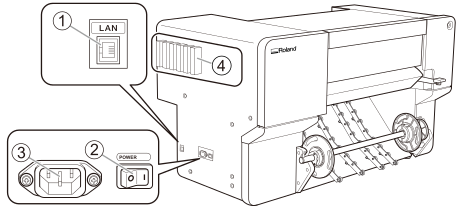
| No. | Name | Function overview |
|---|---|---|
| Ethernet connector | Connects an Ethernet cable. | |
| Main power switch | Switches the main power of the machine on/off. | |
| Power-cord connector | Used to connect the power cable from which power is supplied to the machine. | |
| Ink slots | Store the ink cartridges. |
Machine State Indicated by the Sub Power Button's LED Lamp
The machine states are indicated with LED lamp colors and flashing patterns. The LED lamp allows you to check the state of the machine at a distance.
| LED lamp state | Machine state |
|---|---|
| Off | The power is off. |
| Lit in yellow | The media setup is complete and output is possible. |
| Flashing in yellow | The machine is paused, or heater warm up is in progress. |
| Lit in green | Printing or cutting output is in progress. |
| Lit in blue | Media has not been set up, such as during maintenance operations. |
| Flashing in blue | The machine is in sleep mode or is being turned off. |
| Lit in red | An abnormality has occurred in the machine. |