
Adjusting the Ink-drying Method
This machine is equipped with functions to improve ink adhesion and also to dry the ink. You can adjust the temperature settings to match the type of media and the printing speed.
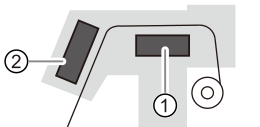
| Print Heater | This heater is used mainly to improve ink adhesion. | |
| Dryer | This is used to dry the ink. |
High Temperature
The areas inside the dryer, under the dryer, and near the extension apron become hot. Exercise caution to avoid burns.
Remove any loaded media or switch off the sub power when printing is not being performed.
The continued application of heat at a single location may cause the release of toxic gases from the media or pose a fire hazard.
Never use media that cannot withstand heat.
Doing so may result in fire or the release of toxic gases or may degrade the media.
Never use the platen or dryer for any purpose for which they are not intended, such as to dry clothing.
Doing so may cause overheating, resulting in fire or accident.
Use the machine in an environment with an ambient temperature of 20 to 30°C (68 to 86°F) and an ambient humidity of 40 to 60%RH.
If the machine is used at an ambient temperature or humidity that is outside the specified ranges, then depending on the type or width of the media, wrinkling or temperature-caused unevenness may occur. If this happens, try lowering the temperature of the print heater and dryer by about 2°C (3.6°F). To obtain stable printing results, however, use the machine in an environment with an ambient temperature and humidity within the specified ranges.