
Setting the Dryer Temperature
-
Basically, use the software RIP (color profile) settings for temperature. Even if you use the software RIP settings, if you need to adjust the temperature, such as when there is smudging or poor drying, change the temperature in the machine settings.
- High temperatures make it easier to dry the ink, but temperatures that are too high can damage the media by deforming or deteriorating it. Select settings appropriate for the media.
Procedure
- Set up the media.
- Tap the following location on the home screen.
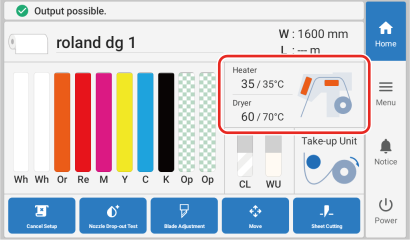
The Heater Temperature screen appears. -
Tap
 or
or  to set the Dryer temperature.
When ink drying is poor, set the temperature to a higher value. Note, however, that a temperature that is too high may degrade the media or cause it to wrinkle.MEMO
to set the Dryer temperature.
When ink drying is poor, set the temperature to a higher value. Note, however, that a temperature that is too high may degrade the media or cause it to wrinkle.MEMO- Default setting: 94°C (201.2°F)
- Tap Save to confirm your entry.
-
Tap
 .
MEMO
.
MEMO- You can also make this setting in the software RIP. When you have made the setting in the software RIP, the software RIP's setting is used.
The home screen appears.