
Job List
You can use this list to check the RIP, printing, and settings for the job.
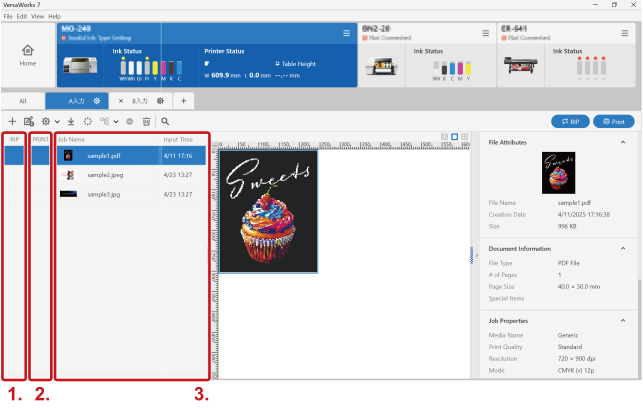
| 1. | RIP | Displays the progress of processing by the RIP.
| ||||
| 2. | Displays the progress of printing.
If you are using version 7.8.2 or a later version, changing the job settings after printing processing will reset this status of the job having undergone printing processing.
| |||||
| 3. | Job Name | Displays jobs (print data names) registered in the queue folder. To select a job to be processed by the RIP or printed, click the desired job. You can change the order of the jobs within the job list by dragging the jobs. To display a shortcut menu (the same functions as the job tool area), right-click the desired job. However, the following settings cannot be configured in the job tool area.
| ||||
The Job Name field shows the job setting details with the following icons and the set job name.
| ||||||
 : The job is being processed by the RIP.
 : The job has been processed by the RIP.
 : RIP processing—including cutting data—has been completed.
 : An error has occurred, and the processing by the RIP cannot be performed.
 : The processing by the RIP has been canceled.
 : The job has undergone printing processing.
 : An error that prevents printing from continuing has occurred (for example, there is no more media).
 : An error that allows printing to resume when the error is cleared has occurred (for example, a cover is open).
 : The job is being generated (standby status).
 : The ink consumption is being estimated.
 : Job group; Variation job
 : Layered job
 : UV Post Cure Job
 : Step & repeat job
 : Nested job
 : Composed job