
Device Area
This area displays various information for the printers registered in VersaWorks.
When selected, the printer is shown with a blue background. Click a blue area to show/hide the Druckerstatus.
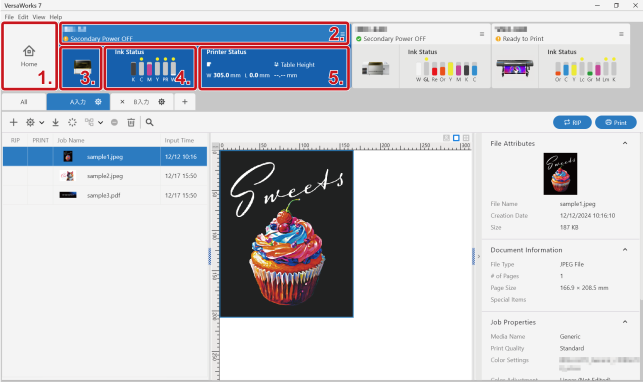
| 1. | Click Start to display Startbildschirm. |
| 2. | Displays the name, status icons, and printer status (connection and power status) for the printer registered in VersaWorks. The selected printer is shown with a blue background. Click a blue area to show/hide the Druckerstatus. Click |
| 3. |
Displays the printer image. |
| 4. | Displays the amount of
ink remaining. Notifications of issues, such as the amount of ink
remaining being low, are displayed as follows.
Nothing is displayed for cutting-dedicated machines in which no ink is loaded. |
| 5. | Displays the media name, media size, and other media information that is managed by the printer. |
 to configure the following settings. Depending on the model you are using, the setting may be disabled.
 : When the amount of ink remaining is
25% or lower, a dummy cartridge is inserted, or ink is being
refilled
: When the amount of ink remaining is
25% or lower, a dummy cartridge is inserted, or ink is being
refilled : When no ink remains or an unknown
ink cartridge is inserted
: When no ink remains or an unknown
ink cartridge is inserted : When no ink cartridge has been
inserted
: When no ink cartridge has been
inserted