
Setting the Print Heater Temperature
-
With the default settings, the temperature rises to the Standby Heater Temperature when the power turns on. On completion of media setup, the temperature rises to the set value.
-
Depending on the usage environment, the temperature of the dryer may become higher than the set temperature, but this does not represent a problem.
-
Temperature settings are not possible when Heater Power accessed from is off.
Procedure
- Set up the media.
-
Tap the following location on the home screen.
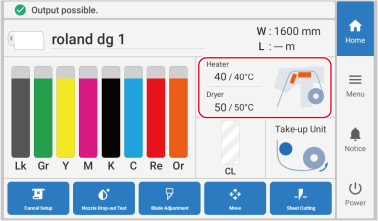 The Heater Temperature screen appears.
 -
Check that the Heater Power is turned on.
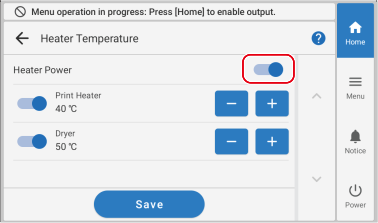
-
Tap
 or
or  to set the Print Heater temperature.
If the ink forms lumps or smudges, raise the temperature. Note, however, that a temperature that is too high may degrade the media or cause it to wrinkle.
to set the Print Heater temperature.
If the ink forms lumps or smudges, raise the temperature. Note, however, that a temperature that is too high may degrade the media or cause it to wrinkle. - Tap Save to confirm your entry.
-
Tap
 to return to the home screen.
MEMO
to return to the home screen.
MEMO-
Default setting: 40°C (104°F)
-
Depending on the RIP software you are using, you can also configure this setting in the RIP software. If you have configured the setting in the RIP software, the RIP software setting is used.
-