
Partially Restricting the Print Heads Used for Printing
When dot drop-out or dot displacement is not improved even after renewing the ink, partially restrict the print heads to use for printing (i.e. prevent the use of the print heads that are causing discharge issues). This operation is called the "nozzle mask," and while it slows down printing speed, it also allows you to decrease the impact of dot drop-out or dot displacement.
First print a test pattern, and then select the nozzle group to use by viewing the test results. After that, use VersaWorks to select the nozzle group used for printing.
1. Performing a Printing Test for the Nozzle Mask
- Set up the media.
-
Tap
 .
.
- Tap .
-
Select Nozzle Mask Test and tap Execute.
Printing of the test pattern starts.
-
Check for dot drop-out and dot displacement by viewing the results of the printing test.
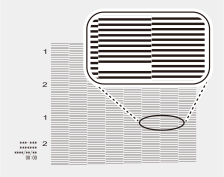
MEMOIf the printing-test results are difficult to interpret
Check the results in a bright location, changing your line of vision. They are visible using the reflection of the light.
- If you have opened the front cover, close it.
-
Tap
 to return to the home screen.
2. Limiting Print Heads Used for Printing: [Nozzle Mask]
Use VersaWorks to select the nozzle group used for printing. For the detailed procedure, see the VersaWorks Master Guide.