
Displaying the Printing Log
Displays Printing Log.
The Job Properties for each job and the Total Time and Total Area for all jobs, can be checked.
First check whether VersaWorks is version 7.5.0 or later.
-
Tap
 .
.
-
Tap .
The following is displayed.
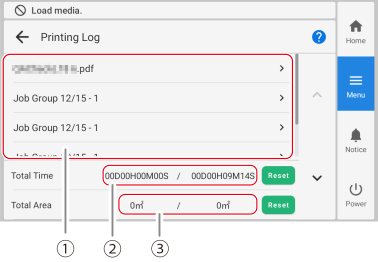
Printing Log Total Time */* is displayed. The left side indicates the trip Total Time, and the right side indicates the total Total Time.
-
Trip Total Time
Displays the total printing hours for any period of time, such as daily or weekly.
To reset to 0, tap Reset.
Reset when you wish to start measurement.
-
Total Total Time
Displays the total cumulative printing time. This function cannot be reset.
Total Area */* is displayed. The left side indicates the trip Total Area, and the right side indicates the total Total Area.
-
Trip Total Area
Displays the total printing area for any period of time, such as daily or weekly.
To reset to 0, tap Reset.
Reset when you wish to start measurement.
-
Total Total Area
Displays the total cumulative printing area. This function cannot be reset.
-
-
To check the Job Properties for a specific job, select the job.
The Job Properties appears.
-
Tap
 to return to the home screen.