
1. Replacing the Blade
Procedure
- Remove any media.
-
Tap
 .
.
-
Tap .
The Blade Replacement screen appears.
-
Tap Execute.
The cutting carriage moves to a position where blade replacement is possible.
-
Follow the instructions on the operation panel to replace the blade.
- Tap
 or
or  to check the procedure.
 - If you complete the work without viewing the instructions, tap Finish All.
MEMO When attaching the blade, orient its tip correctly.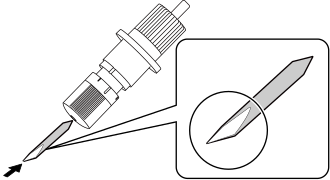
- Tap
- When the replacement of the blade is complete, tap Finish All.
-
When Close the cover. appears, close the front cover.
When you close the front cover, you are returned to the original screen.
-
Tap
 to return to the home screen.