
Windows
The procedure introduced here applies to the following Windows version. Even with the same version, the operation steps, button names, and window titles may differ depending on the OS build.
- Windows 11: Version 24H2
Procedure
- Log on to Windows as the Administrator or a member of the Administrators group.
-
Open Control Panel.
Search for "Control Panel" from the taskbar.
- Click Network and Sharing Center.
- Click Ethernet or Wi-Fi.
-
Click Properties.
If a User Account Control window appears, click Continue.
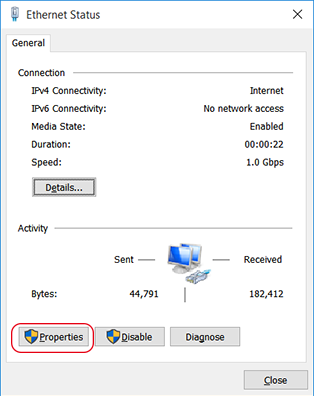
The Ethernet Properties or Wi-Fi Properties window appears.
-
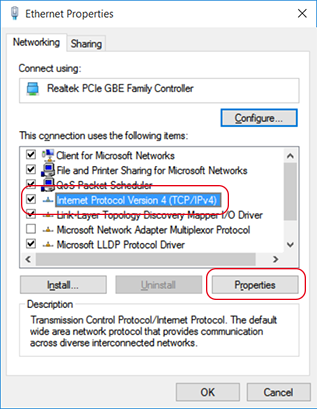
Select Internet Protocol Version 4 (TCP/IPv4), and then click Properties.
If the Internet Protocol check box is clear, select it.
-
Confirm that Obtain an IP address automatically is checked.
If it is not checked, click the box to check it.
- Click OK.
- Click Close in each window.