
2. Performing a Printing Test to Check the Results
Procedure
-
Attach the nozzle drop-out test paper to the light shield cover with masking tape or something similar.
The printing size for the nozzle drop-out test is approximately 200 mm × 100 mm (7.87 in. × 3.94 in.) (landscape).
-
Tap
 on the operation panel.
- Tap .
-
Tap Execute.
Printing of the test pattern starts.
-
Open the front cover.
MEMO
Be sure to hold the handle of the front cover and keep holding it until the cover is completely opened or closed.
If you do not open and close the front cover gently, it may break or you may be injured.
- Check whether there is dot drop-out or dot displacement in the test pattern and whether its uneven colors have been eliminated.
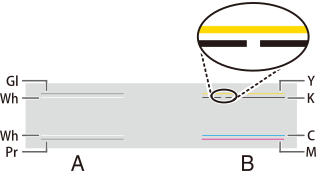 MEMO If the printing-test results are difficult to interpret
Try changing the test paper color, or check the results in a bright location while changing your line of vision. They are visible using the reflection of the light.
- Close the front cover.
-
Tap
 .
The home screen appears.
.
The home screen appears.
If the dot drop-out or dot displacement location is different, repeat medium cleaning two or three times.
If this problem is not fixed, contact your authorized dealer.