
Cleaning the Machine on a Daily Basis
As part of daily cleaning, wipe away any buildup of ink or grime that has adhered to the machine. Clean by wiping with a cloth moistened by neutral detergent diluted with water then wrung dry or a soft, dry cloth.
Never use a solvent such as gasoline, alcohol, or thinner to perform cleaning.
Doing so may cause a fire.
-
This machine is a precision device and is sensitive to dust and dirt. Perform cleaning on a daily basis.
-
Never attempt to oil or lubricate the machine.
- Before cleaning, remove the object.
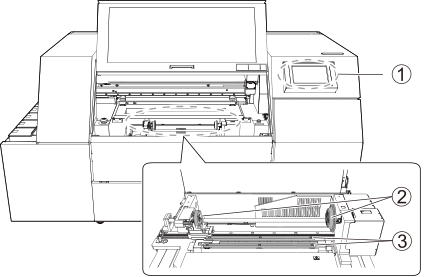
| Operation panel |
The panel used to operate the machine. If dirt or ink adheres to the operation panel, immediately wipe it clean with dry, soft fabric. |
|
| Fixing jig | The provided fixing jig is made of silicone rubber. If dirt or ink accumulates on it, clean it by wiping with a cloth that was moistened by neutral detergent diluted with water and then wrung dry. If this part is dirty, it may not be possible to print at the correct position. | |
| Support table |
If dirt or ink accumulates on it, gently wipe it with a cloth (lint-free) impregnated with anhydrous ethanol or isopropyl alcohol. If the support table is dirty, the object may become dirty or misaligned. |
Frequently clean the inside of the machine using a vacuum cleaner or by wiping with a cloth moistened with water then wrung dry. If dust and dirt accumulate in the machine, they are likely to affix to printed materials.