
Fine-tuning the Cutting Conditions
Procedure
- Set up the media.
- Tap
 Blade Adjustment on the home screen.
 - Tap Change next to Output Start Location.
- Tap
 .The cutting carriage moves to the current base point.
 - Tap
 ,
,  , , or
  to move the cutting carriage to the location where you want to carry out the cutting test.You can freely set the location for the cutting test.
 - Tap Set Base Point Here.
- Tap Execute next to Cutting Test.The test pattern is cut.
- Check the results of the cutting test.Check that the two shapes are peeled off separately, a blade trace (red line) remains on the backing paper, and the backing paper is not cut.
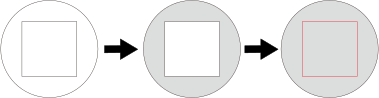
Check item Result Setting item Adjustment Check the shape. The cut shape is distorted. Cutting Speed Reduce Peel off the circle. The square also peels off. Blade Force Increase Some uncut areas remain. Cutting Speed Reduce Peel off the square. The blade leaves faint traces on the backing paper. Blade Force No change The blade trace is indistinct. Increase The blade trace is too deep and cuts into the backing paper. Reduce Check the shape of the square you have peeled off. 
The corners are not rounded and do not have "horns." Blade Offset No change 
The corners are rounded. Increase 
The corners have "horns." Reduce - Tap
 or
or  to change the settings.
Setting item Setting details Default setting Blade Force Set the force (pressure) of the blade. 50 gf (0.11 lbf) Cutting Speed Set the speed of cutting. 30 cm/s (11.81 in./s) Blade Offset Set the blade offset. Enter the listed offset value for the blade.
The offset value for the included blade is 0.250 mm (9.8 mil).
0.250 mm (9.84 mil) Rise Movement Speed Set the blade's up speed during cutting (the speed at which the blade travels when it moves to the next cutting line after cutting one cutting line). If the media comes loose during no-load feed and the blade damages the surface of the media, reduce the speed. 30 cm/s (11.81 in./s) - Tap Save.
- To check the set values, tap Execute for Cutting Test.The test pattern is cut on the left side.
- Check the results of the cutting test.If the two shapes are peeled off separately, a blade trace (red line) remains on the backing paper, and the backing paper is not cut, the adjustment is finished.
- Tap
 .You are returned to the home screen.