
Printer Unit
Front
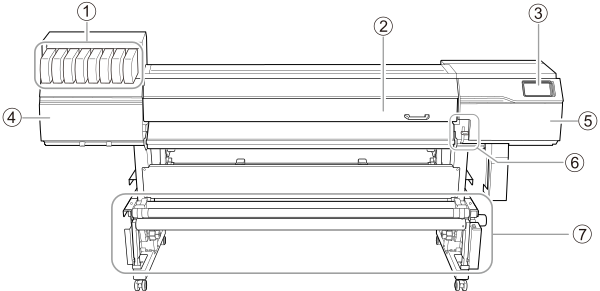
| No. | Name | Function overview |
|---|---|---|
| Cartridge slots | Insert ink cartridges in which ink pouches have been loaded. | |
| Front cover | Prevents contact with the print heads and other such fast-moving parts when the machine is operating. This cover also blocks ultraviolet light from the UV lamp and prevents dust from entering the machine. Keep this cover closed when not loading media or performing maintenance. | |
| Operation panel | The panel used to operate the machine. | |
| Left cover | Provides access to the interior of the left side of the machine. Open this cover when performing maintenance such as cleaning around the print heads. | |
| Right cover | Provides access to the interior of the right side of the machine. Open this cover when performing maintenance such as cleaning. | |
| Loading lever (front) | Secures the media in place and releases it. Use this lever when working at the front of the machine. Lowering the lever secures the media in place. | |
| Take-up unit | Takes up the media after printing. This prevents the printed media from touching the floor. |
Rear
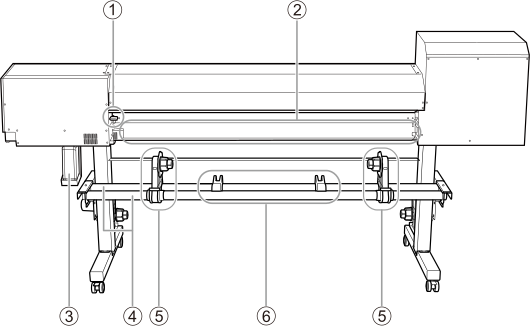
| No. | Name | Function overview |
|---|---|---|
| Loading lever (rear) | Secures the media in place and releases it. Use this when working behind the machine. Lowering the lever secures the media in place. | |
| Rear UV shield | Blocks the light from the UV lamp during printing. Open this shield when you load the media and close it when you are finished loading the media. Printing is not possible with the UV shield open. | |
| Drain bottle | Discharged fluid is stored in this bottle. A message prompting you to dispose of discharged fluid appears when a certain amount of discharged fluid has collected in the bottle. | |
| Shafts | Used to adjust the positions of the media stays and media holders. The media stays and media holders are moved to the left or right along these shafts to match the width of the media. | |
| Media holders | Hold the roll media. Fit the paper tube of the media onto the end caps of the media holders. | |
| Media stays | Temporarily hold the roll media in place. Temporarily place the roll media on these stays when loading this media on the media holders. |
Side
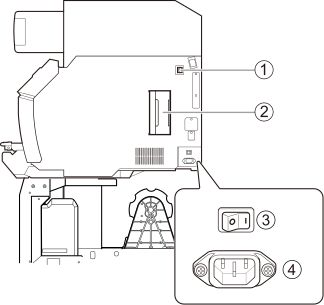
| No. | Name | Function overview |
|---|---|---|
| Ethernet connector | Connects an Ethernet cable. | |
| Cleaning liquid cartridge slot | Stores a cleaning liquid cartridge containing a cleaning liquid pouch. | |
| Main power switch | Switches the main power to the machine on or off. | |
| Power-cord connector | Used to connect the power cable from which power is supplied to the machine. |
Front Cover Interior/Print Head Carriage Area
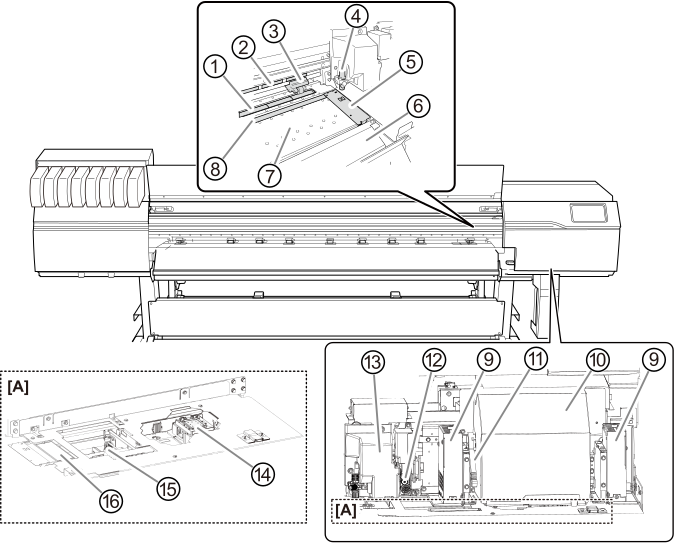
[A]: With the print-head carriage moved to the left during manual cleaning or other maintenance
| No. | Name | Function overview |
|---|---|---|
| Grit roller | Transports the media. | |
| Grit pattern | Indicates the location of a grit roller. When loading media, be sure to place the pinch rollers within the ranges indicated by these patterns. | |
Pinch roller | Clamps the media together with the grit roller for transporting. The roller can be raised or lowered by moving the loading lever up or down. | |
| Blade holder | Houses the blade used during cutting. | |
| Media clamp | Clamps the left and right edges of the media. Each clamp holds down the left or right edge of the media, keeping the media from coming loose and preventing fuzz on the cut edge of the media from touching the print heads. | |
| Apron | This is the path over which the media passes. A front heater that heats the media to prevent it from coming loose is built in. | |
| Platen | This is the path over which the media passes. A suction fan that keeps the media from coming loose is built in. | |
| Blade protector | Protects the cutter blade as it penetrates the media during cutout. | |
| UV-LED device | Irradiates the ultraviolet light after printing to cure the ink. | |
| Print-head carriage | Transports the built-in print heads. | |
| Height-adjustment lever | You can adjust the print-head height. | |
| Separating knife | This separates the media. | |
| Cutting carriage | The blade and the separating knife are inside here. | |
| Print head cap | Prevent the print heads from drying out. Seals to the print heads to protect the ink emission surface when the print heads are at the right side of the machine, such as when waiting for printing. | |
| Wiper | Cleans the print heads. Removes dirt and excess ink that have adhered to these heads. | |
| Flushing sponge | Absorbs the ink being discharged (flushed) to prevent clogging. |
If a Cover Opens during Operation
If the front cover, left cover, right cover, or rear UV shield (hereinafter these items are all referred to as the "cover") opens during an output operation, the machine makes an emergency stop. When an emergency stop occurs, a message prompting you to close the cover appears on the screen. Close the covers as directed in the instructions shown on the screen.
When the cover is closed, you will be able to continue the operation.
If you cannot continue the operation even after you close the cover, a nonrecoverable error may have occurred.
Additionally, if you open a cover during operation, the carriage may move slowly.