
Displaying the Printing Log
Displays Printing Log.
You can check the Job Properties for the last five jobs. You can also check the Total Time and Total Area for jobs (excluding cutting jobs).
- Tap
 .
. - Tap .The following screen appears.
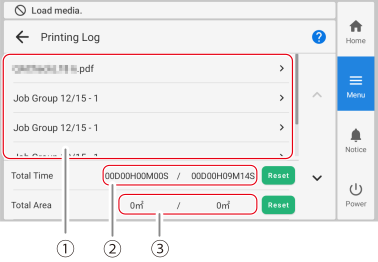
Printing Log The names of the last five jobs are displayed. Tap a job name to display the detailed job log.
Total Time The left side is the trip printing time, and the right side is the total printing time.
The trip printing time is the time after Reset.
You can check the printing time for any period of time, such as daily or weekly. Tap Reset when you wish to start measurement.
The total shows the cumulative printing time. This function cannot be reset.
Total Area The left side is the trip printing area, and the right side is the total printing area.
The trip printing area is the area after Reset.
You can check the printing area for any period of time, such as daily or weekly. Tap Reset when you wish to start measurement.
The total shows the cumulative printing area. This function cannot be reset.
- To check the Job Properties of a job, tap its name.The Job Properties appears.
- Tap
 .You are returned to the home screen.