
Cleaning the UV-LED Device
The UV-LED device is an important component for ink adhesion. It requires periodic and appropriate maintenance. The cleaning of the UV-LED device is referred to as "UV lamp manual cleaning." Be sure to perform UV lamp manual cleaning in the following situations.
- When a message appears
When the message The time for UV lamp manual cleaning has arrived. appears, you can tap
 on the home screen to check the notification details. Tap the notification to display the screen for starting UV lamp manual cleaning.
 - When there is a lot of scattered ink mist and the inside of the machine is soiled
Perform this cleaning every day when frequently printing with the print heads at a distance from the print surface or when ink is emitted to locations that protrude from the print surface. If the scattered ink mist is allowed to harden, it may cause malfunctions.
- When the bases and irradiation windows of the UV-LED device are dirty
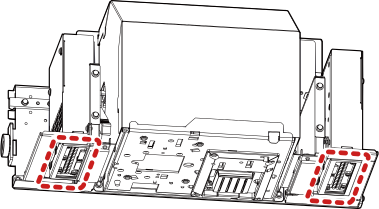
MEMO For hardened ink and other such dirt that cannot be completely cleaned away, contact your authorized dealer.